Author: HES Marketing

How Self-Directed Learning Can Engage and Empower Your Students

Can students really decide how they learn best? That’s a question many schools are wondering as self-directed learning gains popularity across the country. The concept is not new. In fact, its roots trace back to Socrates and Aristotle, but today’s teachers are embracing this instructional strategy as technology offers more opportunities for students to explore topics they find interesting and seek information easily and independently.

Essentially, self-directed learning allows students to take ownership for their learning, deciding what they will learn, and how they will learn it. This empowers students, giving them a primary role in their education. Furthermore, research has emerged to indicate that this method is not only a highly effective way to increase retention, but has many additional positive side effects for students.

How Does This Work in a Classroom?

Allowing your students to choose what they are going to learn based on their own personal interests and strengths sounds nice, but how does this look in a classroom? Well, it’s different for every teacher and every student.

The truth is, there are many different paths to learning and some students will prefer one method over another. Certain students will learn best reading books or websites, while others prefer to watch videos or listen to podcasts. Kinesthetic learners may enjoy physical and virtual field trips. Teachers can help introduce students to these alternative paths to learning and guide students to find what works best for them.

You might give your students a general goal, like learning about marine life. Students would then work with you to determine a topic which interests them and how they will demonstrate their learning. An artistic student may be fascinated by colorful nudibranchs and create an informational pamphlet. Another student may decide to learn about the effects of pollution on beluga whales and write a persuasive letter to the editor of a newspaper. A third student may select to study the marine life in tide pools of their local area, creating a video teaching about the formation of the pools. Each student may have a different learning outcome, but each is deeply invested in the learning process because it is specifically tailored to his/her interests.

What Role do Teachers Play in Self-Directed Learning?

Self-directed learning requires a skill set that must be carefully taught and modeled by their teachers. To build and support self-directed learners, you will need to cover topics like:

  • Functional computer skills
  • Digital literacy
  • Library and research skills
  • Finding credible information
  • Finding resources to assist in the learning process
  • Introducing students to different types of learning outcomes

As students follow their individual pursuits, teachers act like a guide, monitoring progress, helping students find resources, and offering feedback, paving the way for learner independence.

Harnessing Technology to Create Self-Directed Learners 

Technology plays a key role in supporting self-directed learners. You probably use it yourself all the time. Let’s say your dishwasher is leaking. Before you call for repairs, what do you do? You might type “leaky dishwasher“ into a search engine and see what comes up. After watching a DIY video or reading a blog post, you attempt to fix it, based on what you learned. That’s self-directed learning! Some tools self-directed learners use are:

  • Video-conferencing tools
  • Self-publishing
  • Personal Learning Networks
  • ePortfolios
  • Self-Assessment
  • Video-streaming platforms

Today, there is an abundance of online resources available at students’ fingertips, making self-directed learning easy to conduct in the classroom. Using various resources such as Castle Learning and eDoctrina, teachers can reduce the workload of customizing assignments and personalize learning experiences, easily giving students different topics depending on their chosen area of interest. There is really no limit to how technology can develop and support self-directed learners.

Why is Self-Directed Learning So Effective?

The best part about developing self-directed learners is that these skills carry over to different classes and can also be applied in other areas besides school. It helps build skills which develop students into lifelong learners. Here are a few of the biggest ways.

It Cultivates Curiosity

Allowing students the freedom to choose learning objectives based on their own interests helps them enjoy learning. It creates the opportunity for students to follow “rabbit holes” which spawn new topics for discovery.

It Increases Student Motivation

Since students are actively engaged in setting their own learning goals, they are more motivated to participate and dig deeper into hard topics.

It Boosts Understanding and Retention

When students play a role in selecting their focus, they are better able to absorb and retain new information.

Benefits of Self-Directed Learning

As students become the independent architects of their own knowledge, they experience other benefits as well, such as:

Building Digital Literacy Skills

Technology is now firmly entrenched in our schools and classrooms. With more schools integrating a wide variety of online learning components, students need to have competence using digital resources to find and consolidate information.

Developing a Passion to Learn

Self-directed learning is all about creating a passion for learning. Allowing students to choose their learning path actively engages them in activities that they find relevant, interesting and, most of all, fun. It’s not a stretch to realize that active engagement allows students to retain more information than passively listening to or reading about topics. It also encourages deeper learning as students are more motivated to enrich their own learning.

Learning to Take Initiative

Self-directed learners are able to understand what they want to know and determine how best to achieve their learning goals. They are able to take initiative to build their own knowledge.

Building Skills for College and Career Readiness

As self-directed learners diagnose their own learning gaps and build knowledge in specific areas, they also build other important skills. Since they are responsible for their own learning, they develop intrinsic motivation and integrity. Self-directed learners become comfortable asking questions, and aren’t afraid to seek help when they need it. These are important life skills that will serve them well across classrooms, as well as college and career goals.

Here are just some of the life skills that self-directed learners develop and exhibit:

  • Perseverance
  • Setting goals
  • Problem solving
  • Time Management

Self-directed learning provides a feeling of empowerment and is an amazing tool to develop essential life skills and lifelong learners. It encourages deeper learning and supports students to set higher learning goals. The more interested and invested your students are in what they are learning, the more willing and able they will be to do the hard work to achieve their learning goals. You may be surprised at the enthusiasm students exhibit when they are truly invested in their work.

At Harris Education Solutions, we provide solutions that help support educators and encourage students to take ownership of their learning.

Bridging the Three Facets of the Digital Divide

How have you used the internet recently? Maybe you searched for information, read an email, paid a bill, attended a meeting, collaborated on a project, created a presentation, or consulted a doctor. Convenient internet access makes these and other actions quicker and easier.

In this modern era, not using the internet puts people at a significant disadvantage in many aspects of life, including education. The chasm between the haves and have-nots of internet access is called the digital divide. Optimizing the internet’s capabilities requires three components: 1) a computer or other internet-capable device, 2) reliable high-speed internet, 3) sufficient digital literacy skills.

Unfortunately, far too many students in the US lack one or all three components. This video shows the stark difference between students searching for information with internet access versus without it. As dramatic as this video is, searching for information barely scratches the surface of how technology, or EdTech, enhances student learning.

Inequity Factors

Research from the Pew Research Center, the National Education Association, and the International Computer and Information Literacy Study all tell a similar story. Personal factors heavily influence students’ access to computers and the internet. These factors often compound each other and include:

  1. Income level
  2. Geography
  3. Education level of parents
  4. Racial /ethnic background
  5. Income

Not surprisingly, families on tight budgets allocate limited funds to shelter, food, and healthcare over broadband internet service and computers. Even the least expensive devices cost a significant amount of money, and cheap devices often break and lack enough processing speed to be truly useful. Many low-income students do not have a device at home, or multiple household members share one device preventing students from having enough time to finish their homework.

Internet providers typically charge by the speed of the internet they provide. Streaming videos, attending virtual meetings, and uploading and downloading media require about 1.5 megabits per second, or 1.5 Mbps. Cable tends to be the cheapest way to get broadband internet. Texas residents pay about $.12 per MB per month for cable internet, whereas Wyoming residents pay $1.00. Many families cut costs by paying for slower internet that allows students to read and answer emails but not watch videos.

  1. Geography

The cost of broadband does not tell the whole story. The availability of high-speed internet varies dramatically depending on where you live. Students in areas such as rural West Virginia and Montana lack broadband infrastructure, making their internet connections too slow to be useful.

The NEA study ranked states based on students’ access to broadband internet. Complete access meant that they had enough working devices and reliable high-speed internet at home. Mississippi ranks 50th, with only 64% having full access. Meanwhile, 87% of New Hampshire students enjoy complete access. The geographic discrepancy is partially due to students living in rural versus suburban conditions and partly because some populations and policymakers do not prioritize access to the internet. However, even in top-ranking New Hampshire 25,000 students lacked enough access to take advantage of many digital education tools.

  1. Education Level of Parents

Children of parents with limited education have significantly less exposure to computers and digital literacy skills. This trend holds true globally. Higher education typically leads to careers that use computers and technology, whereas a lack of education often leads to jobs involving manual labor.

Ninety-one percent of students with parents with advanced degrees have sufficient internet speed and devices, compared with only 48% of those whose parents did not finish high school. More educated parents are also significantly more advanced in digital literacy skills and can guide their children’s learning.

  1. Racial and Ethnic Background

Finally, there is a high correlation between digital haves and have-nots according to students’ racial and ethnic backgrounds. Eighty-six percent of Asian American students have sufficient access to the internet and devices, compared with 50% of Native American students.

How Schools and Communities Provide Access and Training

While the digital divide in schools correlates with personal factors, community and school infrastructure can help bridge the gap. US municipalities that include broadband as a public utility are rare but quickly growing. State laws with strict requirements about cable providers are a big roadblock for towns wanting to provide broadband as a public utility. There are valid reasons for why public utility broadband is not right for every community, but it often gives more families access to reliable internet at home. This allows lower-income students to work from home instead needing to travel to a library or school. School districts might advocate for state and local measures that would provide more families with low-cost options for internet.

Changing state law and convincing local governments to invest in broadband infrastructure may be great long-term goals. Still, many students’ families need more immediate relief. Some schools are innovating creative solutions. The Coachella Valley Unified School District sends buses with WiFi to underserved neighborhoods to provide access. Some schools work out discounts with commercial internet providers. For more ideas, check out the Discount Internet Guidebook put out by the National Digital Inclusion Alliance.

Schools are also doing a lot to help families acquire devices. A common method is that the schools buy devices using monies from grants, Title One, CARES ACT, or other special funding. Many of these schools then allow teachers and students to take school devices home for homework. Another method is working with non-profits that refurbish devices to help families buy low-cost devices. Partners Bridging the Digital Divide lists many great resources, including where to find refurbished devices.

Overcoming the hurdle of internet access for students and teachers at home is tremendous, but it is not enough. Teachers and students need explicit technological training to take advantage of the tools. Without detailed training, teachers are less inclined to introduce technology in the classroom, so EdTech becomes more frustrating than solving problems. Students of undertrained teachers will get fewer opportunities to advance their digital literacy skills, limiting the closure of the digital divide which could dramatically affect their higher education, career, and daily life. District and state leaders can find professional development resources at the Office of Educational Technology.

A Partner in EdTech

At Harris Education Solutions, we are firm believers in the power of digital solutions for education. We understand that Investing in EdTech is a massive undertaking because it requires carefully considering your desired student outcomes and how to maximize teacher effectiveness. We hope our blogs help guide you in your EdTech journey. Try our Solutions Tool to see which products will help the people at your schools most.

Enable All Students to Access Curriculum with Strong Computer Literacy Skills

Angela entered middle school with a strong foundation in reading, writing, and math. However, middle school teachers expected her to use unfamiliar technology, causing her to feel lost in many lessons. Although her elementary school was academically rigorous, it had neglected to incorporate adequate technology lessons. Angela’s computer literacy deficit made accessing the content in middle school stressful and frustrating.

Recognizing their mistake, the staff at Angela’s former elementary school changed their approach to teaching technology. Teachers introduced lessons focusing on fundamental computer skills and empowered students to learn, create, and collaborate. Students began to hone their skills using learning software with rapid feedback and enhancing projects with multimedia such as music, videos, pictures, and animation. Students transitioning out of that elementary school now have the computer literacy skills to thrive in middle school.

Educators without a strong technology background may feel unsure about how to start integrating technology in their lessons. If that describes you, start with reading Essential Digital Literacy Skills to Teach Digital Natives. Now that you have an overview of digital literacy, this scope and sequence will give you an idea of what to teach in different grades. These guidelines are a starting place and not meant to replace your state standards nor information from your assessments.

Students should master the following skills by 1st Grade:

  • Asks permission before going to any game or website not pre-approved.
  • Understands and uses computer-related vocabulary, such as the hardware and basic operations.
  • Knows how to turn on a device and shut it down properly.
  • Opens and exits programs and apps.
  • Understands how usernames and passwords protect privacy and account settings and can successfully log in using them.
  • Understands the importance of logging off and how to do it.
  • Uses icons and arrows to navigate to desired locations.
  • Uses a touch screen, mouse, or mouse pad to click, drag, double click, and scroll.
  • Ability to use the standard keys on the keyboard such as backspace, space bar, letters, and numbers.
  • Can adjust the volume on headset or speakers to appropriate levels. Too many children suffer hearing loss from having the volume of their headphones too loud.
  • Independently follows multi-step directions such as turning on a computer, opening an application, logging on, choosing a specific menu item, using the application, saving work, and logging off.

Students should master the following skills by 3rd Grade:

  • Understands the different types of devices and their benefits.
  • Distinguishes between being online versus offline and asks permission before going to any new website.
  • Can play, pause, rewind, and forward videos.
  • Saves, names, finds, and prints documents.
  • Uses a child-friendly search engine to find information.
  • Uses a word processor to write, highlight, copy, and paste text in documents.
  • Draws and paints with simple programs.
  • Uses some multi-key functions such as Shift and letter for capital letters and Control Z for undo.

Skills to Master by 5th Grade:

  • Follows online safety guidelines set by adults.
  • Understands the potential damage and permanence of anything posted online.
  • Reads error messages and follows simple troubleshooting directions.
  • Types with fingers on the home keys rather than hunting and pecking.
  • Uploads and resize images.
  • Edits documents with proofreading and formatting tools.
  • Finds specific websites and navigates the menu options.
  • Understands the different types and purposes of websites.
  • Shares and collaborates using simple EdTech tools.
  • Conducts online research and analyzes the information for credibility.
  • Knows how to write and send an email.

Skills to Master in Middle School

  • Recognizes when a website is not safe or appropriate.
  • Identifies common problems and troubleshoots them effectively, such as reloading a frozen website and reconnecting to the internet.
  • Understands the different methods for storing data (thumb drive, hard drive, cloud, etc.) and when each one is most useful.
  • Collaborates with others using comment features, message boards, digital whiteboards, and more.
  • Creates and shows multimedia presentations with pictures, music, and interesting transitions.
  • Creates simple graphs, tables, and spreadsheets to show information.
  • Understands how social media posts affect themselves and others. If the school encourages social media participation, students follow rules of conduct.
  • Knows how to download, rename, and find various file types.
  • Understands the basic ideas behind intellectual property to avoid copyright infringement. Gives credit to original creators with links and names when mentioning or using their work.

Skills to Master in High School:

  • Protects themselves online from phishing, viruses, scams, identity theft, and radicalization.
  • Chooses which (if any) social media platforms are helpful and how to stay safe on them.
  • Customizes settings to optimize their experience.
  • Integrates various applications such as email, calendar, and reminders.
  • Uses proper etiquette when communicating via email, social media, and message boards.
  • Understand how different technology systems work together.
  • Independently learns new computer skills using directions, videos, and other resources.
  • Uses specialized technology in fields of interest.

Just the Beginning

These basic skills will allow students to interact with technology in school and daily life.  As you and your students gain proficiency, you may expand into other computer-related domains such as coding, programming, and creating original work.

Harris Education Solutions partners with educators to help teachers and students thrive. As software providers, we understand that adapting to technology takes time and practice. That is why we provide robust training and support to help you get the insights you need. Visit our solutions page to see which product will most benefit the teachers and students at your school.

Essential Digital Literacy Skills to Teach to Digital Natives

Since before your students were born, the internet has been integral to daily life, making them part of a generation of “digital natives.” Most children can “drag and drop,” “click,” “scroll,” and “login” even before starting elementary school.  However, digital literacy goes far beyond such basic processes. Digital literacy skills fall into various domains such as:

  1. Functional skills
  2. Staying safe online
  3. Finding and evaluating credible information
  4. Using digital tools to create

Learning Functional Computer and Internet Skills

While most youth today get plenty of screen time, many students still lack critical functional computer literacy skills. Some students have limited internet access at home. Even students in homes with fast connections often use it primarily for entertainment rather than learning. Teachers find that students frequently lack the necessary competency to use apps and programs important to education.

The International Society for Technology in Education, or ISTE, offers a wealth of resources to inform you about best practices in digital citizenship and computer literacy. They recommend that teachers provide explicit technological instruction and guided practice. The following list of foundational digital literacy skills is a good starting place to help students succeed with minimal frustration.

  • How to upload, download, and share documents, media, and other file types.
  • How to name, save, and organize files.
  • How to use software such as word processors, spreadsheets, software for collaborating and presenting, e-mail, Learning Management Systems (LMS), and other EdTech.
  • How to log in and out of sites.
  • How to use standard operating systems such as Apple MacOS, Chrome, and Windows.
  • How to use accessories such as cameras, headsets, and mice.

Allow students already adept in all these skills to help their peers (and possibly adults). The recognition of their expertise and opportunity to shine will feel good.

Staying Safe Online

While the internet offers amazing tools for researching, sharing, and creating, it also has a dark side with dangerous people lurking, ready to pounce on people’s vulnerabilities. With both those realities, avoiding the internet is not a practical solution to staying safe. Most students are naive about the type and severity of attacks from scam artists and other nefarious people. Adults must therefore set up safeguards and teach students how to protect themselves online.

Your district’s internet security system should be sufficient for restricting students to safe sites and activities when they are on campus. However, few homes have adequate internet security. The amount of schoolwork that students must do online from home means that teachers, parents, and students share the burden of keeping kids safe online. The Federal Trade Commission offers guidance for what students should avoid doing online. These tips include:

  1. Never share personal information online.
  2. Be wary about downloading any games, apps, or files.
  3. Stay away from illegal or untrustworthy sites.
  4. Avoid interacting with strangers online.

Finding Credible Information

The internet gives us unfettered access to a plethora of videos, websites, blog posts, social media posts, and scholarly articles. It allows us to explore almost any topic in-depth with minimal effort and time. The problem is that the quality of information varies dramatically. Students using the internet for research need to find and vet credible information sources.

Search engines use keywords to search the internet for relevant content. Therefore, teaching students what keywords to put in the query box significantly reduces their research time. Teach students to use specific keywords to narrow down the context of their search results.

For example, a student learning about the ecosystem in Yellowstone will get higher quality results from entering “Predators and Prey in Yellowstone” and “Food web in Yellowstone” than just “food web” or “Yellowstone.” Show students how to refine their keyword searches as they learn more about their subject. For more advanced research tips, read 35 Google Search Hacks that are Going to Change Your Life.

The adage, “Don’t believe everything you read,” is especially accurate when using the internet. Student researchers must understand that they will find misleading and incorrect information. Evaluating the credibility of information also strengthens their critical thinking skills. Even a young child can learn to recognize that cigarette ads from the 1940s are not credible sources about how smoking affects a person’s health.  Here are some questions students can use to evaluate their sources:

  • How recent is the information?
  • Is the author/organization an expert in this field?
  • Is this information relevant to my query?
  • What biases or external motivation does the author have?
  • Do I understand this information, and how does it fit with what I already know?

Using Digital Tools to Create

Quality cloud-based software programs empower students to unleash their creativity and apply it to almost any subject.  If you are tech-savvy, you might want to offer enrichment lessons in using creative software before assigning a project. If computers aren’t your strong suit, consider giving students time to investigate creative software independently and share what they learn. Here are some fun programs your students can start trying to create videos, art, animation, 3d models, music, and so much more.

  • Animation- DigiCel FlipBook and Doodly
  • Photo editing- Adobe Photoshop and Affinity Photo
  • Video editing- Movavi Video Editor and iMovie
  • Music composition-Dorico and Sibelius
  • Drawing- Krita and Artweave Free
  • 3d Modeling- BlocksCad and Morphi
  • Coding and programing-Scratch and Tynker
  • Game Development- GameMaker and Unity

Many professional-grade software programs offer low-cost and free versions for advanced student learning. However, be cautious about introducing students to robust programs that exceed your students’ capabilities. A seventh grader tried creating 3d models with the program Blender. After hours of frustration, he vowed never to use it again. Luckily, he gave it another try several years later and now uses it frequently and competently. Unfortunately, some students would likely get permanently discouraged.

Our Role in Technology Education

The everchanging and sophisticated global economy requires that students continue to advance their technological skills. However, teachers do not need to feel pressured to keep up with the fanciest technology. Helping students learn basic computer literacy skills will allow them to develop more skills as they need them. Harris Education Solutions provides software solutions to help teachers teach, and students learn. Let us know how we can best support you.

Five Ideas for Creating a Strong Learning Community During the Pandemic (and Other Transitions)

An engaging, strong learning community helps ignite a spark for lifelong learning. Watching the movies “Spare Parts” and “October Sky” are inspirational for many teachers because they highlight the amazing growth and intellectual curiosity possible with an engaged, positive learning community.

Members of a strong learning community who feel safe and valued are likely to have enough confidence to participate, collaborate, explore new ideas, and persevere with challenging work. However, even in the best of times, uniting individuals into a team of learners means integrating bonding activities throughout your lessons. These activities foster a sense of belonging to the classroom learning community.

Of course, creating a supportive and enthusiastic class culture during the instability from Covid-19 requires more planning than usual. Quarantines negatively affect attendance and interrupt the flow. Stress impacts interpersonal interactions and behavior. Divisions from broader society may trickle down into classroom interactions.

Additionally, some students are adjusting to the traditional classroom after working from home. Many teachers echo the sentiments of this middle school teacher who remarked, “my seventh graders this year act more like sixth graders of previous years.”

  1. Help Students Integrate and Adjust

Students who learned at home last year missed many shared bonding experiences. Try these ideas to include returning students into an existing learning community.

Help classmates get to know each other with introductory activities. Students will feel more comfortable engaging in academic conversations knowing each other’s names and feeling a connection. “Two Lies and a Truth” invites everyone to tell fun stories and facts about themselves. “Four Corners” is another great activity to help students find commonalities.

Adapt fun end-of-the-year activities to the beginning of the year by changing the focus from a learning review to a preview of learning. These lively, memorable learning activities give students events to talk about outside the classroom.

A friend makes a new environment much less stressful. Pair new students with a friendly peer to help navigate the school cafeteria and other social situations.

Learn about students’ educational backgrounds to make sure everyone knows how different systems work. For example, students who did not have virtual instruction last year may not be as familiar with EdTech tools that are second nature to other students. You can assign tech mentors to students who want them.

  1. Prepare for Virtual Community Building

Switching between face-to-face instruction to remote requires many adjustments with different norms, hours, and responsibilities. Anything you can do to build unity and consistency between the two modalities will make the transitions less stressful. You might want to supplement your in-person community-building activities with ones that also work virtually to prepare for the possibility of remote or hybrid instruction.

Your favorite strong learning community-building apps are great for any learning environment. Popular community-building EdTech tools include social media, Bitmoji, and communication apps.

Incorporating simple traditions creates a sense of belonging and unites everyone in the goal of learning. For example, start the session with a quick warm-up activity that engages everyone. Some group warm-up activities that work in both modalities are online quiz games, polls, and brainteasers. Likewise, close with an interactive chant, song, or phrase. You can choose something as simple as saying, “Now, go learn something fun!” and students replying, “Off we go!”

  1. Maintain Relationships with Absent Students and Welcome them Back

Including quarantining students in classroom activities whenever possible reminds everyone that absent students are valued community members. EdTech tools such as video-conferencing and digital whiteboards allow all learners to participate from any location with an internet connection. Reading aloud is a favorite activity for sharing virtually, and even high school students gain value from it.

Acknowledge students who have been absent for more than a few days and celebrate their return. Having everyone sign a card or banner only takes 5 minutes, yet it goes a long way towards strengthening bonds. Such gestures reassure students that people remember them and care about their well-being.

Missing a lot of information is stressful. Ask face-to-face students to write changes and events in a “while you were out” binder. The binder could include details such as schedule changes, new rules, and essential vocabulary. Recording this information serves a dual purpose. It empowers in-person community members to help quarantined students in a meaningful way and reduces returning students’ anxiety about missing details.

  1. Teach Communication Skills

Effective communication is a pillar to participating in any community. That is why reading, writing, listening, and speaking are standards included in every subject. Group work provides many valuable opportunities to teach communication skills. Collaborating and cooperating help students connect on a deeper level.

Part of effective communication includes knowing how to disagree respectfully and value various perspectives. Show students that those different opinions need not disrupt relationships and class harmony. Show them the power of listening and responding calmly.  They might try, “I see where you are coming from, and yet I still disagree because …”

  1. Support Mental and Emotional Health

The emotional temperature of a class permeates every aspect of the learning community. Academic and social pressures make school stressful for many students. Provide a few minutes for students to journal, do a wellness check-in, or use mindfulness apps.

Students experiencing intense emotions will need avenues to express themselves appropriately. The early warning system in edInsight from the Harris Education Solutions’ ecosystem helps alert potential trouble spots for individual learners. Please refer students in crisis to an administrator or mental health professional.

We are Stronger Together

At Harris Education Solutions, we commend educators’ remarkable resilience for building learning communities throughout disruptions from the pandemic. Some of these ideas will help develop a learning community in different situations too. Other events that require extra effort to promote a positive learning culture include:

  • welcoming a large influx of international newcomers
  • rebuilding after a severe weather event or other trauma
  • adapting to a changing financial landscape

Whatever your situation, we are here to partner with you every step of the way.

Evaluating & Assessing Academic-Return on Investment with EdTech

Everyone everywhere always wants “the biggest bang for their buck” possible. Responsible allocation of public funds may not be your most exciting job description, yet it is probably one of your most important responsibilities.

Taxpayers and other stakeholders deserve evidence that school district leaders spend money wisely. Communicating every dollar is allocated into learning inspires trust among community members. Hopefully, this confidence translates into increased engagement and voting on district issues.

Most people don’t understand the complexities of district budgeting; however, they are likely familiar with the concept of return on investment. Academic-Return on Investment, or A-ROI, builds on that familiar model.

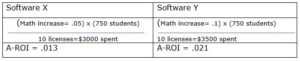
A-ROI is a great way to demonstrate the cost-effectiveness of educational expenditures. You can read about A-ROI in-depth in the publication, Spending Money Wisely. It shows the formula for A-ROI as:

(Learning increase) x (# of students helped)

_________________________________________

$ spent

Essential considerations for A-ROI require answering questions such as:

  1. What programs and strategies are successful, and how can we expand those successes to more students?
  2. What programs and strategies are failing to show the desired results? Are there any reasons not to eliminate associated expenses?
  3. What are the most cost-effective ways to help struggling students?
  4. Where can we reduce costs without negatively impacting students?

Answering these questions and acting on the information provides evidence of responsible budgeting.

How EdTech Improves Student Learning

On a per-student cost basis, EdTech is often an excellent investment. Some software programs are designed for the student to interact with directly. These programs often provide immediate growth-producing feedback and engage students with a game-like model. Some EdTech programs aim to help educators boost efficiency. The EdTech software with the highest A-ROI helps students learn and streamlines the workload.

Helping teachers work efficiently increases student learning because they can devote more energy to differentiation and instruction. Our eight pillars of success will help you explore potential areas for improving instruction and efficiency. EdTech platforms offered by Harris Education Solutions help teachers in the following ways:

  • Seeing which students need remediation and acceleration and in what areas
  • Automatically grading assignments and tests
  • Making it easy to create assignments and tests that align with standards and state assessments
  • Collaborating with colleagues
  • Communicating with students and their families
  • Inputting and finding student information
  • Creating various versions of any assignment to allow for accommodations and differentiation
  • Sending work to absent students
  • Providing engaging practice for some students while the teacher works with other students
A Sample Scenario of Using A-ROI for Evaluating Software

Let’s imagine that your district is piloting two software programs, and you want to evaluate them for A-ROI. For the sake of simplicity, let’s say that you test both programs with ten math teachers with an average of 75 students each. Software program X helps math teachers save ten hours per year. These extra planning hours raise math scores by 5%. Software X costs $300 per license.

Software program Y helps math teachers save 10 hours, provides data to drive instruction, and gives students helpful practice. Students’ math scores go up 10%. Software Y costs $350 per license.

Despite costing more per license, Software Y has a significantly better A-ROI.

Valuing Educator Time as a Strong A-ROI

In addition to more time for planning and collaborating, another benefit of investing in work efficiency is that it enhances morale. Menial tasks make teachers feel that the districts do not appreciate their expertise. Feeling undervalued often contributes to teacher attrition. Since hiring and training new teachers costs considerably more than retaining highly qualified teachers, it behooves district leaders to provide them with time-saving tools.

Using EdTech to Assess A-ROI

Not only can you use A-ROI to assess your EdTech, but you can also use EdTech to evaluate the A-ROI of other programs. The A-ROI formula appears deceptively simple. The challenge lies in collecting information to put into the formula. Many administrators explain that software platforms’ ability to help assess A-ROI is where the platforms shine.

EdTech software such as Castle LearningeDoctrinaedInsight, and eWalk help measure learning. They also make it easy to aggregate and disaggregate data, analyze the information, and share it with others. The platforms allow administrators to see the effect size of various programs by segmenting student populations. These robust capabilities make answering questions about A-ROI possible.

You might want to pilot two different strategies before deciding on one and expanding it. For example, you might try reducing class sizes for half the fifth graders in the district and free after-school tutoring for the other half. Using the data software programs, you can look at the fifth-grade groups to see how many students benefitted, to what degree, and for what price. You will then have meaningful information to feel confident in making the best decision about expansion.

Ask Educators

While A-ROI provides important numerical information, educators’ experiences about EdTech solutions provide valuable insight too. Ask teachers and principals for details about how different programs changed their workday and advanced student learning.

EdTech Solutions as a Tool to Help People

Teachers inspire, encourage, and educate our future leaders. District leaders provide the tools for teachers to thrive. At Harris Education Solutions, we develop EdTech to help educators support student success.

Taking Time for Self-Care Helps Everyone

If you feel tired, irritable, apathetic, or forgetful, you may be showing signs of burning out. You are not alone; this year exhausted many teachers and administrators. Be aware that the negative feelings can create a downward spiral making it hard to motivate yourself to do activities that will help you feel better. Educators give a lot of themselves, sometimes to such a degree that they forget to schedule time for themselves.  At Harris Education Solution, we support educators doing amazing work to support students. We hope this list of self-care ideas inspires you to do something for yourself today.

This next part is for you if you are saying to yourself, “Sure, I would love some ‘me-time,’ but I don’t have time for it.” Set boundaries and sometimes say “no” to requests and invitations so you can say “yes” to more free time and less stress. A daily routine with positive habits can make a big difference in your mental, physical, and emotional health. You can start small and add a few habits that make you feel better. Below is a list of ideas to get you started. The list is organized by time commitment so that you can work up from your current routine.

Less than a Minute
  • Examine your thoughts and reframe any negative self-talk with a more positive perspective. Turn “I failed at something” into “I challenged myself and gave myself a learning opportunity.”
  • Give someone a long hug.
  • Breathe deeply.
  • Drink a glass of water.
  • Energize yourself with some quick exercises like running up the stairs or doing a few push-ups.
  • Adjust your posture and relax any tense muscles.
  • Smile or laugh to trick your brain into feeling happier.
  • Give someone a sincere compliment.
  • Light a candle or use an essential oil diffuser with a scent that you enjoy. Be aware that not everyone takes pleasure from the same fragrances, and oils can cause reactions for some people. Many schools have rules against using them in the school building.
  • Give yourself a hand massage while putting lotion on. 
Less than Twenty Minutes
  • Meditate.
  • Connect with your spiritual side.
  • Start or write in a gratitude journal.
  • Eat a healthy snack.
  • Take a power nap.
  • Organize a small area that has been bugging you. The space you inhabit affects your mood and improving it will bring a smile to your face.
  • Sit outside.
  • Buy or cut a bouquet of flowers for your home.
  • Replace a burnt-out lightbulb or do some other neglected chore to feel a sense of accomplishment.
  • Look at pictures from a happy time.
  • Dream about what you will do when you have more time and take one step towards making that happen.
  • Listen to your favorite music.
  • Cuddle with your pet or a loved one.
  • Write out and prioritize a to-do list. Look for responsibilities that you can delegate or eliminate. Remember to add and prioritize a self-care item to your list. 
An Hour or Two
  • Immerse yourself into singing, dancing, coloring, drawing, playing a musical instrument, or whatever creative activity calms you and induces a relaxed mental flow.
  • Enjoy a long bath or shower.
  • Get a massage.
  • Catch up on sleep by taking a nap, going to bed early, or sleeping in late. Getting enough sleep is critical to cognitive function, emotional regulation, and overall health.
  • Put away your cell phone and computer, or at least turn off notifications. These interruptions cause unnecessary stress.
  • Escape into a good story with a book or movie.
  • Moving your body has excellent health and mental benefits. Starting to exercise when you are out of the habit is hard, but the reward is worth it. Choose the workout routine that you enjoy most. It can be as simple as going for a walk. Consider asking a friend to be your workout partner to help keep you motivated.
  • Visit with a friend or family member who has a positive outlook and makes you laugh. If your relationships have withered from working too much, this is a great time to meet new people. Perhaps try volunteering, joining a club, or attending a place of worship. A good support network will help you through the toughest of times.
  • Get rid of excess clutter. Donate, sell, or throw away items that you have not used recently. Look to Marie Kondo’s show on Netflix for inspiration.
  • Plant a garden.
  • Go for a hike or bike ride away from the hustle of cars and people. Nature has restorative powers.
  • Do a hobby. If you don’t have a hobby, think of an activity you once enjoyed and or one that has sparked your curiosity. You can connect with enthusiasts on social media to help you get started.
  • Eat a special meal.
More than a Day
  • Take a vacation. Ideally, you can escape to your favorite place in the world. However, you don’t have to go anywhere to take a break. Just decide that for a few days you will postpone all possible responsibilities. Try to do some fun activities to make positive memories.
  • Some wounds are more profound and require more work to overcome. You might consider therapy to guide you through the healing process.
Make Self-Care a Habit

We hope you find encouragement in one or more of these suggestions and that you commit to doing one thing just for yourself every day. Taking time to nurture your mental, physical, and emotional health goes a long way toward rejuvenating your energy. You deserve to take time to de-stress for your own well-being. It is not an indulgent luxury; it is a basic human need. It has the bonus of benefiting everyone around you too. When you feel better, you will have more patience, laugh more, and connect better.

At Harris Education Solutions, we care about educators and hope to support them so they can enjoy long careers.

Staying Engaged Through the Last Day of School

Thoughts of summer vacation are filling your students’ heads (and probably yours too). To maximize instructional minutes, you may be thinking about end-of-the-year engagement strategies. While the basic tenets of engagement hold, the spring offers unique opportunities to reflect on learning and stimulate new ideas. The engagement strategies in this blog review knowledge without adding much pressure on you and the students.

Many teachers use the last few weeks of school for a big project or reviewing for a final exam. Reviewing for a summative assessment helps find instructional gaps, explore conceptual misunderstandings, and apply information and skills creatively. However, the strain of these high-stakes assessments may inhibit students’ brains from processing the information on a deeper level. Plus, after the summative assessment, you will likely have a few days where everyone feels relaxed, and you will want to culminate their progress in a rewarding way.

Science backs up the idea that the inherent good mood before summer vacation enhances students’ abilities to create strong memories of information.

Cognitive Neuroscience Explains why a Relaxed Mood and Fun Activities Improve Learning

Cognitive neuroscience is the study of the brain’s physical and chemical make-up to understand emotions and thinking. It blends psychology and neuroscience, and the findings have important implications for educators. We use cognitive neuroscience to explain why the end of the school year is the perfect time to reinforce what students learned during the year.

Long-term memory, which is any memory lasting more than a few seconds, is critical for learning. Scientists categorize memories in a variety of ways, with three memory types being especially relevant to education. Episodic memories are of events, procedural memories are how to do something, and semantic memories are general knowledge. Learning a new skill, like the steps to long division, uses procedural memory. Learning new information uses semantic memory. Of course, memory types overlap, and the duration and strength of memories vary widely.

When a semantic memory corresponds with an episodic memory, it creates a stronger ability to recall the associated knowledge. For example, students who make an explosion in science class will remember the cause and effect of enzymes better than those who just read about it.  Neurotransmitters are also crucial to retaining information. Cognitive neuroscientists theorize that the right balance of neurotransmitters influence the strength and duration of memories.

Neurotransmitters are chemical messengers that travel among the neurons via synapses. Different neurotransmitters get released depending on emotions and other stimuli. Our brains release the neurotransmitters cortisol and adrenaline with stress. Too much cortisol and adrenaline inhibit learning. That is one reason why stress negatively impacts our ability to make and recall procedural and semantic memories.

Conversely, our brains release serotonin and dopamine when we feel relaxed and happy. Serotonin primes the brain for understanding new information and creating new memories, and dopamine helps the brain imprint information into long-term memory.

All this science confirms what teachers already know. Students learn best when they feel alert, happy, and not stressed. Students are likely to have the right neurotransmitter balance at the end of the year because they have less stress about grades and are happy anticipating long summer days. Additionally, the final days may give you more freedom for experiential lessons that enhance episodic memories related to the content. Therefore, cognitive neuroscience justifies using the last few days to improve learning outcomes with fun academic activities.

Fun Activities for Reviewing and Applying Previous Learning

This list of low-prep activities includes enjoyable ways to keep students academically engaged until the end. The ideas take advantage of the power of neurotransmitters and episodic memories to strengthen recall of everything students learned throughout the year. Some students may even create new episodic memories related to content. Use these ideas after completing final tests and projects or expand them into larger projects. The ideas are general enough to adapt to fit most subjects and levels.

  1. Each student or small group creates a cartoon drawing and caption representing a unit or concept. Then, assemble the pages to make a book covering the whole year and share the book with the class.
  2. Students prepare a lesson about anything related to this year’s content and teach it to the class. Allow for two or three questions per presentation. If you have the temperament for it, allow students to mimic your teaching style and dress like you when they teach their lesson. As you all laugh together, know that they are creating memories that will help them remember the content.
  3. Student groups create a performance related to any of the content. Performances could include skits, dances, music, monologues, or stand-up comedy routines.
  4. Students create questions for quiz games to try to stump their friends or even the teacher. Apps such as Kahoot and Quizlet make it easy to play remotely and in person.
  5. Take a virtual field trip. Many museums, zoos, and cultural centers have abundant resources.
  6. Students create an audio-visual presentation for future students with helpful hints about the content and the class.
  7. Students help you evaluate which lessons were best and worst and why. As they discuss their favorite lessons, they will recall the learning they experienced. As they discuss ones that confused them, you might be able to clear up misunderstandings. You can use their feedback for your professional growth.
  8. Inspire intellectual curiosity by asking students what lingering questions they have and what they want to learn about next.
  9. Write a book as a class patterned after a favorite children’s book, such as The Very Hungry Caterpillar or If You Give a Mouse a Cookie. Encourage students to use humor and keep the ideas factual.
  10. Do a “snowstorm” where everyone writes down one fact that they learned, crumples the paper into a “snowball” and throws it. Everyone picks up someone else’s snowball and reads it aloud. You can repeat this activity with multiple themes, such as questions, reflections, and what they want to learn next.
  11. Students imagine an invention that would solve a problem talked about in class. They then create an elevator pitch to sell their invention to their classroom.  Auction the creations with monopoly money.
  12. Write open-ended reflective questions on a beach ball and have kids toss it around the room. Students answer the question their hand is touching when they catch the ball. Then, they throw it to the next person.
  13. Create an awards ceremony for the best and worst topics from the year. Students nominate and vote on which topics win titles such as, “Most Confusing,” “Easiest to Learn,” “Most Fun,” and “Most Boring.” Use the conversations about nominations to clear up misunderstandings and celebrate learning.
  14. Students make and share posters of their “Top Ten Favorite Class Moments.”
  15. Have students write letters to their future selves about what they learned this year. Put the letters in envelopes that students address to themselves and put a Forever stamp on them. Mail the letters to them in one year.
Concluding the Year

We hope these ideas help you keep students engaged in learning, help students remember what they learned in your class, and close the year on a positive note.

Remember that while cognitive growth is important, celebrating the journey and growth you made together is also essential. Provide time for students to say goodbye, sign yearbooks, and enjoy a treat. As you close out your school year, we hope you get the refreshing break you deserve.

When you return, whether for summer school or in the fall, remember that our solution, Castle Learning, is available to support you and student learning.

Ideas for Maintaining Academic Integrity in High School with Distance Learning

Whether teaching face-to-face or remotely, upholding academic integrity in high school takes a consistent and multi-pronged approach. Polls show that more than 50 percent of high school students take unethical academic shortcuts at least once in high school, and some do it much more frequently. The International Center for Academic Integrity says on its website:

McCabe’s surveys of over 70,000 high school students at over 24 high schools in the United States demonstrated that 64 percent of students admitted to cheating on a test, 58 percent admitted to plagiarism, and 95 percent said they participated in some form of cheating, whether it was on a test, plagiarism or copying homework.

Plagiarism and cheating undermine the assessments’ value. Even copying homework has negative consequences. Students taking shortcuts often do not bother to learn foundational material and then struggle with subsequent concepts. Finally, cheating is unfair to the students who earn their grades.

Students cheat when three criteria are met. 1) The students consider cheating only mildly ethically problematic. 2) The rewards outweigh the risks. 3) Cheating is easier than doing the work.

The first two conditions do not change with remote versus face-to-face learning, but the third one does change. The inherent difficulty of monitoring students during distance learning makes maintaining academic integrity more challenging. Addressing all three conditions helps them stay academically honest in any learning environment.

Encourage Academically Ethical Behavior

Cheating has become so normalized that even students who consider themselves as honest individuals admit that they cheat.  In surveys, these students say that cheating does not diminish their view of their own overall integrity.  Many teachers find that directly addressing the ethics of cheating reduces the rate. You can implement the following ideas remotely or in person:

  1. Set the expectation that most students are academically honest and explain that you will put in safeguards to encourage that behavior.
  2. Explicitly explain what constitutes cheating and how to avoid it.
  3. Discuss academic integrity in class and ask students to express how they feel when they hear of classmates cheating. High school students are sensitive to peer pressure and therefore are less likely to cheat when they think their friends will judge them negatively.
  4. Ask students to sign an honor code. Honor codes are simple and surprisingly effective. Signing their name to a promise to have academic integrity makes it harder for students to see themselves as honest if they breach it.
Change the Risk Versus Reward Ratio

High school students are often under immense pressure to get high grades. Good grades open opportunities for scholarships and more prestigious colleges. The rewards that come from a high GPA change the goal of high school for many students (and their parents). Instead of working for the purpose of learning, they work to get an A.

Students may feel tempted to cheat if they can get an A without spending hours studying. A poll at Fordham University found cheaters boast a 3.41 GPA, while non-cheaters average 2.85. Making the risk of getting caught not worth the reward of getting a better grade deters academic dishonesty. Try the following few strategies to increase the risk of getting caught and decrease the stakes of each grade and evaluation:

  1. Assess students frequently. Computer-based assessments such as those from Castle Learning and eDoctrina make creating and grading assessments easier.
  2. Break large projects and essays into smaller pieces with interim due dates. This practice guides students with pacing and helps them build a solid foundation. Grading each component also dilutes the value of the final grade to reduce the benefit of copying.
  3. Post the repercussions for academic dishonesty.
  4. Emphasize learning and cooperation over competition and grades.
  5. Report any suspicion of academic misconduct to your administrator to investigate.
  6. Closely monitor students during tests. If you are teaching remotely, you can monitor by asking them to keep their cameras on and using a Chromebook monitoring software.
Make Cheating Harder than Doing the Work Honestly

Sometimes students cheat because they want good grades without investing the necessary time and effort to study. However, the motivation disappears if learning is easier than cheating. Then they must choose between doing the work or getting an unsatisfactory grade. Hopefully, they decide to study, but either way, they are staying academically honest.  The following suggestions either make cheating more difficult or doing well on the assessment easier:

  1. Deter students from sharing answers with each other. Use a large bank of questions and then create multiple versions of the test. If you don’t have a large enough bank to create completely different test questions, randomize the order of questions. Collecting a large bank of questions is much easier if you are using Castle Learning or eDoctrina. These platforms allow you to share test questions with other teachers and provide questions for many standards.
  2. Allow a specific window of time for taking the test so students can’t take the test and then tell their friends the answers. Use the settings on computer-based assessment platforms to allow specific access windows for students taking the test remotely.
  3. Do not let anyone see feedback on specific questions until the window for taking the exam closes.
  4. If possible, lockdown student browsers when they take tests.
  5. Use remote proctoring software. Be sure to do a trial run before the actual test.
  6. Use some open-ended questions with higher-order thinking skills, not just factual recall.
  7. Assign paper topics that would be hard to buy from a commercial paper mill, such as myessaywriter.net
  8. Use a plagiarism checker.
  9. Allow “open book” tests and ask questions that require personal reflection and applying knowledge.
  10. Use clear rubrics and guidelines for the course, so everyone knows what to expect and how to study.
  11. Help students prepare by providing study guides, vocabulary handouts, and copies of old exams or sample essays.
  12. Show students how to cite sources and give credit to original ideas.
  13. Before any significant test, make time for answering questions and giving extra help. If you are teaching remotely, you can do this by setting up virtual office hours.

Following these tips will help students develop good habits and support academic honesty whether they are learning remotely or in person. Castle Learning and eDoctrina from Harris Education Solutions make giving computer-based assessments easier and help encourage student integrity.

Nine Ideas to Keep the Learning Going All Summer Long

If you are like many school administrators, spring is when you start feeling pressure to help students maintain their learning during the summer months. Considering the recent educational interruptions and hardships from COVID, preventing summer learning loss is more important than ever. So how can you persuade students to continue learning during the summer months? It’s tricky, but some districts are trying some creative problem-solving. Here are a few ideas.

Most districts offer summer school as part of the solution. Summer school has various forms and goes by many names, such as extended school year, credit recovery program, academic camp, and summer academy. Whatever you call summer school, it translates to more days learning, building relationships, and engaging minds. While the potential benefits are clear, attendance is typically low. Families don’t prioritize summer school at the same priority level as they do during the regular school year. It may be tempting to hold back promoting unless they regularly attend, but this approach would result in unpleasant backlash from families.

To promote learning without threatening negative consequences, try some of these ideas:

  1. Ask families ahead of time what barriers they might have for student attendance and try to remove those barriers.
  2. Encourage “Self-Study” on Castle Learning so students can keep practicing their skills even if they miss a few days of class. You can also suggest Self-Study to make up for missing assignments or extra credit. Self-Study allows students to learn and progress at their own pace in many subjects and levels. The questions come from the bank of questions that teachers can select. The questions have all the same great features you have come to expect from Castle Learning, such as hints and instant feedback. Teachers can track student progress so they can give credit or incentives to students who learn with it.
  3. Lengthen summer school sessions to accommodate poor attendance.
  4. Offer a remote school option, so students learn from grandma’s house or wherever they happen to be.
  5. Try to make summer school enjoyable with fun activities and themes.
  6. Offer summer school right before school starts or right after the school year ends so it doesn’t feel like as much of an interruption to vacation.
  7. Offer incentives for good attendance.
  8. Incorporate other services and perks such as using a community garden, meals, and special events into the summer school program.
  9. Despite all your efforts, some of your students will be unable to attend summer school. Suggest that they use “Self-Study.” You may even offer an incentive program to increase participation. Students can choose “Rocket Mode” or “Expert Mode.” Rocket Mode is the default choice because it has a more straightforward user interface, and we generally recommend it. The expert mode works well for high school students who have specific topics they want to review for a test. Students can use this guide for navigating self-study.

Like students, most teachers would rather be relaxing in the summer. Ask teachers how you can entice them to teach during the summer and try to provide those things. Think beyond pay (which is also important) to make teaching during the summer more enjoyable. Teachers agreeing to teach summer school appreciate the resources on Castle Learning for reducing the time they spend on prepping and grading assignments. The platform is easy for teaching remotely, in person, or a combination.

At Harris Education Solutions, we want students to feel prepared in the fall. To aid in that goal, Castle Learning provides courtesy access for existing customers over the summer months.

Supporting English Language Learners

Everyone wants more resources to help English language learners. Harris Education Solutions has two platforms that teachers of ELL students appreciate. Castle Learning and eDoctrina include several tools that support students overcoming language barriers.

Different Tools for Different Levels of English Proficiency

English language learners have widely different instructional needs based on their backgrounds. While not every tool available on the Castle Learning and eDoctrina platforms is appropriate for every ELL student, each feature greatly benefits a particular subset of ELL students.

Plenty of ELL students have lived in the US for years. Many of these students have an advantage over their monolingual peers because multilingualism promotes cognitive development. However, biliteracy takes years to develop, so primary teachers will want to provide consistent support and instruction to promote English proficiency and literacy. Teachers will also want to encourage developing fluency and literacy in the home language whenever possible.

Recently immigrated students frequently need significant, global support. In addition to their academic challenges, they often struggle with culture shock and homesickness. Immigrant students with a solid academic background will transfer their content knowledge and skills, making their transition less challenging than immigrants with minimal formal education.

Whatever the new arrivals’ background, your patience and empathy make adjusting to a new system, culture, and language less stressful. The Castle Learning and eDoctrina platforms decrease the work it takes to meet their academic needs, freeing some time to support their emotional needs.

Helping ELL Students Meet the Standards

The educational goal for ELL students is the same as their native English-speaking peers. Regardless of their background, they should meet the standards in all subjects, including English literacy. To help students succeed, teachers scaffold content lessons and teach English. Students with more limited English proficiency may also need their assignments adapted.

Castle Learning and eDoctrina make scaffolding and adapting easier. The platforms also include resources for teaching English.

Scaffolding means structuring lessons to help ELL students meet the same objectives as their peers. Teachers unfamiliar with scaffolding instruction sometimes make the mistake of choosing activities that require only low-level thinking skills. Watered-down instruction limits English language learners’ access to a quality education.

Adapting assignments and assessments provides a way for some ELL students to show what they know. These adaptations lower the frustration level for immigrant students struggling in a new language.

Follow State Guidelines

Your state provides guidelines for assessing, setting benchmarks, and promoting quality instruction for English language learners. Thirty-five states belong to the WIDA consortium, which provides the comprehensive WIDA 2020 Standards Framework. Notably, CaliforniaArizonaTexas, and New York, which all have high concentrations of English language learners, use independent frameworks. Some districts may supplement the state’s framework.

You will want to use your state’s formal assessment to measure students’ English proficiency for academics. Gauging students’ proficiency levels with informal interactions distorts perceptions. Many students have a higher level of proficiency in social contexts than they do in academic contexts. The distinction misleads many educators into thinking that some students no longer need supports. Sadly, sometimes teachers wonder if a child is “faking” not understanding due to the discrepancy in academic and social language proficiency.

To experience how ELL students often feel reading in a non-native language, you might try reading articles in The New England Journal of Medicine. Notice how much time and concentration it takes to understand text with unfamiliar ideas and words.

Provide Support with Scaffolded Instruction

You could spend years learning to scaffold instruction. Below are a few quick ideas to get you started:

  • Connect prior knowledge to new lessons.
  • Pre-teach and display academic vocabulary.
  • Use graphic organizers and other visual aids to help students organize information.
  • Teach and display sentence frames related to the content. Sentence frames allow students to fill in the blanks with their ideas without coming up with the syntax. For example, a history teacher might teach, “The ______ caused _______ because _______.”
Provide Support by Adapting Assignments

Here are a few ideas on how to adapt assignments and assessments for ELL students needing additional supports. These adaptations are beneficial for students with low to medium levels of English proficiency and literacy.

  • Irregular spelling doesn’t make learning to read English easy. “Enough” and “though” don’t rhyme, but “queue” and “to” do. Students with emerging literacy skills benefit from hearing and reading words simultaneously. Give students audio versions of written text until they read fluently in English.
  • Reading text in a non-native language takes longer to process. Give ELL students enough time to think by individualizing how much time you allow them on assessments.
  • Provide extra practice before tests, so students hear the associated vocabulary more.
  • Allow newly arrived students with minimal English skills to use a dictionary or translation tool to help them understand.
Use eDoctrina and Castle Learning to Teach English, Scaffold Instruction, and Adapt Assignments

eDoctrina and Castle Learning reduce the workload of supporting ELL students. Choose the appropriate features to make your life easier and meet the needs of your ELL students. All features are available on both platforms unless otherwise noted.

  • Share your best assignments with other ESL teachers with a few clicks. Invite them to share their best assignments with you too. Collaborating to create effective ESL resources will help students improve their English proficiency.
  • Supplement your ELA program with a wealth of pre-made English language arts resources.
  • Add explanations to assignments that help ELL students access the material.
  • Upload graphic organizers, videos, and pictures to any assignment to help students visualize ideas.
  • Customize the assessment window for students who would benefit from extra time.
  • Provide assessments in Spanish for newly arrived Spanish-speaking students. Castle Learning has assessments available in Spanish to help you check a student’s understanding of various subjects and place them in the correct classes. You can print these in Spanish or convert them online. Available Spanish translations include NYS Regents exams in Algebra I, Global History and Geography, US History, Earth Science, and Living Environment.  Castle Learning also offers K-12 reading sets that are translated into Spanish.
  • Encourage continued literacy in French or Spanish if that is their home language with Castle Learning.
  • Allow students to use the Google Translate feature to translate a question or passage into their native language. Google Translate is far from perfect, but it is often sufficient for students to understand the content and not spend time translating.
  • Help students overcome some of the obstacles of English spelling oddities by allowing them to use the text-to-speech feature.
  • Preview vocabulary with Castle Learning. Later, when students come across the word in the lesson context, they will better understand what it means and how to use it. Castle Learning has a vast bank of vocabulary questions that you can search by keyword, level, and subject. You can also quickly make digital vocabulary flashcards.
  • Assign Castle Learning’s self-study to direct students to practice in the subjects they need help. The self-study feature provides unlimited practice and instant feedback with vocabulary and language structures.
  • Include audio, video, or text to any assignment using eDoctrina. Students can also answer with audio, so they get practice speaking.
One Lesson at a Time

When you first start teaching ELL students, helping them achieve grade level may feel daunting. However, helping them flourish is one of the most rewarding parts of any teacher’s career. At Harris Education Solutions, we make tools to help you do your best work.

Six Ways to Develop Strong Work Habits with Young Remote Learners

Educators agree that virtual instruction is not optimal in any grade, but especially in the early years. Grades kindergarten through second grade lay the foundation for future academic success. Yet, as of early December 2020,  63% of US students in grades K-2 received some of their schooling virtually this school year. Their teachers are under pressure to help them develop strong academic habits. 

Challenges with Remote Instruction Particular to Primary Students 

Children in primary grades lack experience with basic school tasks. Every assignment requires step-by-step direct instruction and constant feedback. Delivering this level of detailed guidance virtually takes more time to plan and implement. Children’s inexperience with technology also often means that teachers need to allocate extra time for troubleshooting technological issues. 

Young children have short attention spans and easily get distracted. In a typical classroom, a teacher quickly identifies and redirects when a child gets off task. In a remote environment, keeping children focused on their work often requires help from older family members. Adults in the house also need to remind young students to do their work off-line because children under the age of eight rarely have time management skills.  

Young children also have not yet developed effective coping methods for stress.  Yet, they feel the stress from changes in their lives and because they pick up on adults’ tension. Many youngsters struggled to make sense of it all. Powerless and frustrated, a lot of young children struggle to regulate their biorhythms and behavior. Instilling academic responsibility is a monumental task in the best of times. When the whole world feels disrupted, the task is incredibly arduous. 

Success Despite the Odds 

Even in the face of these obstacles, teachers are helping students learn to do their work during virtual instruction. Children as young as five come to class, participate, do their work, and learn. To accomplish this impressive feat, teachers and families work together. Teachers are adjusting these six time-tested methods for teaching work habits to fit remote and hybrid models:

  • Communicating with Families 

Teachers of primary students repeatedly emphasize that families are pivotal in cultivating successful learning habits. Teaming up with guardians is doubly vital during remote learning because they remind children to get work done and log in to remote class meetings. However, even the most dedicated parents don’t always know how to best support their child. Communicating frequently and clearly is perhaps the most important action a primary teacher does. Luckily, technology makes communicating easier than ever. If you are interested in streamlining communication, read An Educators Guide to Great Communication with Families

  • Building Relationships  

Young children like pleasing their teacher, and this motivates them to finish assignments. Research backs up the incredible importance of teacher-student relationships. An article in Education Week says:  

A Review of Educational Research analysis of 46 studies found that strong teacher-student relationships were associated in both the short- and long-term with improvements on practically every measure schools care about: higher student academic engagement, attendance, grades, fewer disruptive behaviors and suspensions, and lower school dropout rates. 

However, teachers trying to build a relationship over a computer screen requires added bonding activities and creativity. Virtual home visits are a favorite technique to get to know more about students’ interests. Get more ideas about building relationships in the article, Applying Progressive Teaching Practices to the Post Pandemic Era

  • Providing Emotional Support 

Emotional stress inhibits students’ ability to reason and do schoolwork. To overcome that barrier, teachers help their young students learn to cope with big emotions. Daily emotional check-ins and teaching students self-calming methods help students focus academically. For more details read, Three Steps to Emotionally Support Students to Promote Academic Success.  

Transitioning back into the classroom will again create stress for some students. Refer to the Help Students Returning to the Classroom Navigate their Emotions for some tips. 

  • Encouraging Ownership and Engagement  

Students in primary grades rarely care about their grades. They care about learning and having fun. To motivate them during remote instruction, teachers encourage students to take ownership of their progress. Computer-based learning apps work well virtually. The apps also give immediate feedback and micro-rewards that students like.   

Teachers also use EdTech to create social, fun, and engaging lessons. Even the youngest students have learned to use EdTech to learn and interact with their friends. For more ideas about engagement and ownership read, How to Embrace the New Frontier of Engaging Students Virtually

  • Setting Routines and Expectations 

Predictable routines help children make sense of their lives and feel more in control. The more they can rely on the stability of virtual school patterns, the better. Reliable routines and guidelines help students show up and find a rhythm. Students attending school remotely may need different rules than those in person. Different expectations can be especially confusing to young students in a hybrid situation. Setting up clear behavioral standards helps students feel confident about what they are supposed to do. For a sample set of norms, refer to How to Set Expectations for Virtual Class Meetings 

Students know when to show up for class when teachers keep the schedules consistent for small group and whole group meetings. If parents or students forget what or when they were supposed to do something, they can refer to visual schedules and assignments posted on the LMS.  

  • Providing Mental and Physical Breaks 

Students learn more when they are calm and enjoying themselves. Many K-2 teachers begin lessons with silly songs, yoga, and other activities that make students move or laugh. These light-hearted breaks become even more important when students experience “Zoom fatigue.” Once a teacher is ready for calmness, reading aloud is perfect because students relax while listening. The read-aloud also exposes emerging readers to new vocabulary, stories, and ideas. The article Ideas for Reading Aloud in Multiple Environments describes some helpful tips for modifying a read-aloud for remote and hybrid learners. 

Developing Academic Responsibility is a Team Effort 

Teachers and families are cooperating to make remote learning enjoyable for many young children. As a result, they are establishing strong work habits that will serve them well for the rest of their school career. 

At Harris Education Solutions, we provide solutions that help support educators during remote and face-to-face learning.