Preparing Students for Computer-Based Testing

Computer based tests (CBT) are often given in schools to test students and determine their level of preparedness for the next grade, or even the next level of school. They are also sometimes used for school ratings to exhibit the average test score of students in a school, as well as periodic state testing.Although students tend to dread computer based tests, these types of tests can help students in more ways than one. They help with concentration, focus, and critical thinking. There are a number of things teachers and administrators can do in order to prepare students for a computer based test:

  • Put together an assessment team to work together on test development discussing question formats, how many will be included on the test, test design, implementation and platform.
  • Have a practice run that includes sample questions on the same or similar topics covered on the actual assessment, as well as question formats that mimic the real test questions.
  • Design a timeline for test day so students know what to expect and how long the test will take.
  • Work with technology experts to ensure on test day everything runs smoothly (booting up computers, login details, etc.)
  • Walk through the test finalization process including submitting answers, gathering and sharing test results.

With assessment formats and question types designed by educators to mirror state testing, Castle Learning and eDoctrina are excellent instructional support resources.We’ve created a guide with helpful tips on preparing students for CBT. Click HERE to view the guide.

Evaluating & Assessing Academic-Return on Investment with EdTech

Everyone everywhere always wants “the biggest bang for their buck” possible. Responsible allocation of public funds may not be your most exciting job description, yet it is probably one of your most important responsibilities.

Taxpayers and other stakeholders deserve evidence that school district leaders spend money wisely. Communicating every dollar is allocated into learning inspires trust among community members. Hopefully, this confidence translates into increased engagement and voting on district issues.

Most people don’t understand the complexities of district budgeting; however, they are likely familiar with the concept of return on investment. Academic-Return on Investment, or A-ROI, builds on that familiar model.

A-ROI is a great way to demonstrate the cost-effectiveness of educational expenditures. You can read about A-ROI in-depth in the publication, Spending Money Wisely. It shows the formula for A-ROI as:

(Learning increase) x (# of students helped)

_________________________________________

$ spent

Essential considerations for A-ROI require answering questions such as:

  1. What programs and strategies are successful, and how can we expand those successes to more students?
  2. What programs and strategies are failing to show the desired results? Are there any reasons not to eliminate associated expenses?
  3. What are the most cost-effective ways to help struggling students?
  4. Where can we reduce costs without negatively impacting students?

Answering these questions and acting on the information provides evidence of responsible budgeting.

How EdTech Improves Student Learning

On a per-student cost basis, EdTech is often an excellent investment. Some software programs are designed for the student to interact with directly. These programs often provide immediate growth-producing feedback and engage students with a game-like model. Some EdTech programs aim to help educators boost efficiency. The EdTech software with the highest A-ROI helps students learn and streamlines the workload.

Helping teachers work efficiently increases student learning because they can devote more energy to differentiation and instruction. Our eight pillars of success will help you explore potential areas for improving instruction and efficiency. EdTech platforms offered by Harris Education Solutions help teachers in the following ways:

  • Seeing which students need remediation and acceleration and in what areas
  • Automatically grading assignments and tests
  • Making it easy to create assignments and tests that align with standards and state assessments
  • Collaborating with colleagues
  • Communicating with students and their families
  • Inputting and finding student information
  • Creating various versions of any assignment to allow for accommodations and differentiation
  • Sending work to absent students
  • Providing engaging practice for some students while the teacher works with other students
A Sample Scenario of Using A-ROI for Evaluating Software

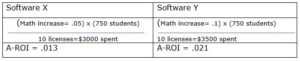
Let’s imagine that your district is piloting two software programs, and you want to evaluate them for A-ROI. For the sake of simplicity, let’s say that you test both programs with ten math teachers with an average of 75 students each. Software program X helps math teachers save ten hours per year. These extra planning hours raise math scores by 5%. Software X costs $300 per license.

Software program Y helps math teachers save 10 hours, provides data to drive instruction, and gives students helpful practice. Students’ math scores go up 10%. Software Y costs $350 per license.

Despite costing more per license, Software Y has a significantly better A-ROI.

Valuing Educator Time as a Strong A-ROI

In addition to more time for planning and collaborating, another benefit of investing in work efficiency is that it enhances morale. Menial tasks make teachers feel that the districts do not appreciate their expertise. Feeling undervalued often contributes to teacher attrition. Since hiring and training new teachers costs considerably more than retaining highly qualified teachers, it behooves district leaders to provide them with time-saving tools.

Using EdTech to Assess A-ROI

Not only can you use A-ROI to assess your EdTech, but you can also use EdTech to evaluate the A-ROI of other programs. The A-ROI formula appears deceptively simple. The challenge lies in collecting information to put into the formula. Many administrators explain that software platforms’ ability to help assess A-ROI is where the platforms shine.

EdTech software such as Castle LearningeDoctrinaedInsight, and eWalk help measure learning. They also make it easy to aggregate and disaggregate data, analyze the information, and share it with others. The platforms allow administrators to see the effect size of various programs by segmenting student populations. These robust capabilities make answering questions about A-ROI possible.

You might want to pilot two different strategies before deciding on one and expanding it. For example, you might try reducing class sizes for half the fifth graders in the district and free after-school tutoring for the other half. Using the data software programs, you can look at the fifth-grade groups to see how many students benefitted, to what degree, and for what price. You will then have meaningful information to feel confident in making the best decision about expansion.

Ask Educators

While A-ROI provides important numerical information, educators’ experiences about EdTech solutions provide valuable insight too. Ask teachers and principals for details about how different programs changed their workday and advanced student learning.

EdTech Solutions as a Tool to Help People

Teachers inspire, encourage, and educate our future leaders. District leaders provide the tools for teachers to thrive. At Harris Education Solutions, we develop EdTech to help educators support student success. Take our Solutions Tool survey to discover the platform that best meets your A-ROI goals.

Ideas for Maintaining Academic Integrity in High School with Distance Learning

Whether teaching face-to-face or remotely, upholding academic integrity in high school takes a consistent and multi-pronged approach. Polls show that more than 50 percent of high school students take unethical academic shortcuts at least once in high school, and some do it much more frequently. The International Center for Academic Integrity says on its website:

McCabe’s surveys of over 70,000 high school students at over 24 high schools in the United States demonstrated that 64 percent of students admitted to cheating on a test, 58 percent admitted to plagiarism, and 95 percent said they participated in some form of cheating, whether it was on a test, plagiarism or copying homework.

Plagiarism and cheating undermine the assessments’ value. Even copying homework has negative consequences. Students taking shortcuts often do not bother to learn foundational material and then struggle with subsequent concepts. Finally, cheating is unfair to the students who earn their grades.

Students cheat when three criteria are met. 1) The students consider cheating only mildly ethically problematic. 2) The rewards outweigh the risks. 3) Cheating is easier than doing the work.

The first two conditions do not change with remote versus face-to-face learning, but the third one does change. The inherent difficulty of monitoring students during distance learning makes maintaining academic integrity more challenging. Addressing all three conditions helps them stay academically honest in any learning environment.

Encourage Academically Ethical Behavior

Cheating has become so normalized that even students who consider themselves as honest individuals admit that they cheat.  In surveys, these students say that cheating does not diminish their view of their own overall integrity.  Many teachers find that directly addressing the ethics of cheating reduces the rate. You can implement the following ideas remotely or in person:

  1. Set the expectation that most students are academically honest and explain that you will put in safeguards to encourage that behavior.
  2. Explicitly explain what constitutes cheating and how to avoid it.
  3. Discuss academic integrity in class and ask students to express how they feel when they hear of classmates cheating. High school students are sensitive to peer pressure and therefore are less likely to cheat when they think their friends will judge them negatively.
  4. Ask students to sign an honor code. Honor codes are simple and surprisingly effective. Signing their name to a promise to have academic integrity makes it harder for students to see themselves as honest if they breach it.
Change the Risk Versus Reward Ratio

High school students are often under immense pressure to get high grades. Good grades open opportunities for scholarships and more prestigious colleges. The rewards that come from a high GPA change the goal of high school for many students (and their parents). Instead of working for the purpose of learning, they work to get an A.

Students may feel tempted to cheat if they can get an A without spending hours studying. A poll at Fordham University found cheaters boast a 3.41 GPA, while non-cheaters average 2.85. Making the risk of getting caught not worth the reward of getting a better grade deters academic dishonesty. Try the following few strategies to increase the risk of getting caught and decrease the stakes of each grade and evaluation:

  1. Assess students frequently. Computer-based assessments such as those from Castle Learning and eDoctrina make creating and grading assessments easier.
  2. Break large projects and essays into smaller pieces with interim due dates. This practice guides students with pacing and helps them build a solid foundation. Grading each component also dilutes the value of the final grade to reduce the benefit of copying.
  3. Post the repercussions for academic dishonesty.
  4. Emphasize learning and cooperation over competition and grades.
  5. Report any suspicion of academic misconduct to your administrator to investigate.
  6. Closely monitor students during tests. If you are teaching remotely, you can monitor by asking them to keep their cameras on and using a Chromebook monitoring software.
Make Cheating Harder than Doing the Work Honestly

Sometimes students cheat because they want good grades without investing the necessary time and effort to study. However, the motivation disappears if learning is easier than cheating. Then they must choose between doing the work or getting an unsatisfactory grade. Hopefully, they decide to study, but either way, they are staying academically honest.  The following suggestions either make cheating more difficult or doing well on the assessment easier:

  1. Deter students from sharing answers with each other. Use a large bank of questions and then create multiple versions of the test. If you don’t have a large enough bank to create completely different test questions, randomize the order of questions. Collecting a large bank of questions is much easier if you are using Castle Learning or eDoctrina. These platforms allow you to share test questions with other teachers and provide questions for many standards.
  2. Allow a specific window of time for taking the test so students can’t take the test and then tell their friends the answers. Use the settings on computer-based assessment platforms to allow specific access windows for students taking the test remotely.
  3. Do not let anyone see feedback on specific questions until the window for taking the exam closes.
  4. If possible, lockdown student browsers when they take tests.
  5. Use remote proctoring software. Be sure to do a trial run before the actual test.
  6. Use some open-ended questions with higher-order thinking skills, not just factual recall.
  7. Assign paper topics that would be hard to buy from a commercial paper mill, such as myessaywriter.net
  8. Use a plagiarism checker.
  9. Allow “open book” tests and ask questions that require personal reflection and applying knowledge.
  10. Use clear rubrics and guidelines for the course, so everyone knows what to expect and how to study.
  11. Help students prepare by providing study guides, vocabulary handouts, and copies of old exams or sample essays.
  12. Show students how to cite sources and give credit to original ideas.
  13. Before any significant test, make time for answering questions and giving extra help. If you are teaching remotely, you can do this by setting up virtual office hours.

Following these tips will help students develop good habits and support academic honesty whether they are learning remotely or in person. Castle Learning and eDoctrina from Harris Education Solutions make giving computer-based assessments easier and help encourage student integrity.

Using Data to Pivot Instruction to Meet the Needs of Distance Learners

Pivoting Instruction

As an administrator, you don’t directly teach students, yet you play a vital role in their progress. You provide resources and guidance to teachers, empowering them to deliver targeted, customized instruction. These days teacher resources must include ways to ensure that distance learners advance adequately. Teaching remote learners requires changing some traditional instructional practices to prevent distance learners from disengaging.

How do teachers know what they need to change?  You can provide some professional development about research-backed strategies. However, there is still a bit of trial and error involved in discovering what works best in their specific situation and student population.

To see what strategies work best, teachers and principals need to monitor student progress systematically and measure the effect rate of interventions. How can they figure out which instructional methods are serving their specific group of distance learners? They would have to analyze the data from their learning population.

The Gap between the Goal and the Reality

Educators love talking about the benefits of data-driven instruction. Yet you must ask yourself, how often do teachers use detailed data analysis as a driving force for their instructional decisions? Probably not as much as you would like. Why is there such a disconnect between the ideal and actual practices?

You may want to ask teachers, “What holds you back from implementing data in more of your instructional decisions?”

You will probably get an earful describing the labor-intensive methods for organizing data points into useful information. Most teachers and principals already well worked beyond their contract hours before the pandemic. Now, many feel as though they are drowning at work. Keeping up-to-date with data organization feels like a pie-in-the-sky dream. The stresses of providing quality education remotely only exacerbates the problem. Yet, remote learners need data-driven instruction even more than face-to-face learners do.

Bridging the Gap

What can you do at the district level to bridge the gap between the desire to use data to drive instruction and actually using it? Gathering data points is not a problem. The challenge lies in organizing them in a useful way. Without flexible organizational tools, the data is painstaking to organize. Thus, rendering it almost impossible to use for pivoting instruction.

You can change the way teachers interact with data by providing efficient and easy-to-use tools. The right software organizes thousands of data points and puts data-driven instruction within reach. Lacking useful software leaves teachers with two unfavorable choices. Either they spend hours of personal time, manually tracking and analyzing data- or they admit defeat and stop trying to implement data-driven instruction. One option leads to teacher burnout, and the other choice leads to hunch-driven instruction.

Improve Instruction Quality with more Efficient Data Tools

One tool to dramatically increase efficiency is software with computer-based assessments. The software automatically organizes results from the students’ responses. Computer-based assessments include formative and summative assessments. Whereas formative assessments provide a snapshot of student learning, summative assessments span more material and provide educators with broader learning patterns. Both are important.

As soon as students finish an assessment, teachers quickly see what students have mastered and where interventions are needed. No time wasted creating endless spreadsheets. Teachers may wish to filter all the remote learners to evaluate if the environment affected understanding. Toggling from one domain to another takes only a few clicks.

The more assessments students take, the more data points the system has about individuals and groups of students. The teacher can then quickly analyze what strategies are working, and not working, for remote students. The way to pivot instruction becomes more and more evident.

If a much larger proportion of remote learners answered incorrectly than face-to-face learners did, that provides evidence that the instructional method did not work well for remote learners.  Teachers learn two essential pieces of information 1) They need to reteach the concept, and 2) Not to employ that instructional method in future lessons. If an entire grade level scores poorly on a concept, administrators know to investigate further. Perhaps supplemental curriculum resources or professional development would solve the issue.

Computer-based assessments, while always valuable, are especially critical with remote instruction. Face-to-face students give subtle cues, such as slumped shoulders, when they don’t understand. Such feedback is a data point alerting the teacher to intervene. During remote instruction, teachers have fewer behavioral cues and, therefore, must rely heavily on assessments.

The Color-Coded Dashboard and Alert System

Like teaching, driving requires continuous monitoring and adjusting with various conditions. The driver uses gauges to monitor speed, gas levels, and engine temperature. When something needs immediate attention, a beep or light alerts the driver.

Instructional data dashboards provide similar functions. Educators can monitor many measurements all from one place. When someone needs close attention, the dashboard alerts them by showing up in bright red. The color-coded dashboards make it easy for teachers to make informed instructional decisions based on data.

The importance of the dashboard is especially critical with remote learners because gauging engagement is difficult. However, after a few assessments, teachers may notice red alerts on their dashboards, indicating that a student is falling behind. The teacher then knows to take immediate action to help that child succeed.

Districts have many educational dashboards to choose from, and each one has a variety of benefits. Many teachers like eDoctrina because of its flexibility of viewing options. They can look at their whole class, narrow the field to sub-groups, and focus on individuals. This feature puts making data-informed instructional decisions in the hands of teachers.

eDoctrina Offers a Data Solution

eDoctrina is a cloud-based software that integrates computer-based assessments, user-friendly analysis tools, and a student dashboard.  Teachers use eDoctrina for:

  • Assessments
  • Data Reporting
  • Question Banks
  • RTI – MTSS Goal Tracking
  • PBIS
  • Online Learning

Most importantly, they like the ability to serve their remote learners with data-driven instruction- and still have time for a personal life.

District administrators like eDoctrina too, but for different reasons. They like it for planning & curriculum mapping, tracking professional development, and monitoring educator accountability.

Not every district has the same needs, so eDoctrina has various levels of support. The Educator Suite provides tools for planning and assessing and an RTI student goal module. The Accountability Suite includes educator effectiveness tools and student learning objectives. Adding auxiliary functions customizes the software license to create the exact tool you need. Giving educators the information they need to pivot instruction for remote learners benefits all learners.

How to Effectively Deliver a Virtual Test or Assignment with Castle Learning

At Castle Learning, we are committed to improving education, including remote teaching. We provide an online tool that works anywhere with internet access, including homes or schools. While online tools help with in-person instruction, they are vital to the success of remote education. Please note that although this blog focuses on the ease of digital delivery, you can print, display, or digitally deliver any content you create.

For more information on creating tests and assignments for remote instruction, please refer to a previous blog – How Castle Helps Create Tests and Assignments when Teaching Virtually.

Integrations with Digital Platforms

Although you can use Castle Learning as a stand-alone application, many teachers prefer to integrate it with Google Classroom, Schoology, or Canvas. Integrations reduce the number of places students need to look to keep track of assignments and grades. On the platform, students see the assignment as a link. Clicking on the link takes students directly to the appropriate assignment in their student center.

Setting Up Your Classes

First, ensure that your students are entered into a class on your Castle teacher account. This process may happen via an automated district daily sync, or you can manually select students.

Next, consider making additional groups beyond official class rosters. These groupings will save you time and effort throughout the year because it increases the efficiency of differentiating instruction and making modifications. Creating each group only takes a few minutes, and editing them later is even quicker.

Then, you can modify the settings for specific students or groups. Setting changes are available from the class page and the assignment deployment stage. You might choose to enable features such as computer-generated translation and text-to-speech with highlighting. Changing student settings gives these students access to the appropriate accommodations for every test and assignment in every class. This feature makes complying with Individualized Learning Plans (IEPs) and best practices for English Language Learners (ELLs) easier.

With your classes set up, delivering the tests and assignments to the appropriate students takes only a few clicks.

Delivering Differentiated Versions to Various Groups

Students in various classes benefit from similar assignment modifications, such as a different pace or amount of questions. Creating separate “classes” for multiple groups has the added benefit of making assigning differentiated material quick. It takes mere seconds to assign “Ten Questions about Chapter 1” to Group A and assign “Twelve Questions about Chapter 1” to Group B.

Secondary school teachers appreciate how quickly they can create and deliver modified assignments to students in various class sections. Elementary school teachers often categorize students by level for each subject. Making suitable modifications follows best practices for assigning homework.

Practicing, Studying, Assessing and Reviewing

Any assignment can serve multiple purposes. When assigning content, decide if you want students to use it for practice, studying, assessing, or reviewing. Delivering it in “open” mode, “quiz” mode, or “review-only” mode changes how students see it.

Open mode is perfect for practice. It gives students two attempts for each question. It also offers students access to vocabulary, feedback, and reasoning after the first attempt. Click “Quiz mode” for assessments. It gives students only one chance to answer each question. They also do not have access to the other helpful resources of “open” mode. In either mode, additional features are available such as randomizing the questions.

“Review-only” mode is perfect for studying for a test or retake. Students see the questions, their responses, the correct answers, and the reasons for the correct answers, but it does not allow them to answer questions.

Providing Opportunity for Retakes

The retake option provides students multiple attempts to meet a set mastery level. You can choose to give that option automatically or manually. Most teachers prefer auto-retake because it reduces their task load. To select the automatic retake, simply set up the designated mastery level when you issue the original assignment. The data report from the retakes provides the teacher with progress monitoring and growth evaluation.

Adding Time Limits and Time Frames

It is important to note the flexibility differences between “quick assign” and “assign to students.” Generally, students should have limited access to assessments to promote academic integrity. Using “assign to students” gives you the ability to decide when students can start a test and the amount of time they can spend on a test. You may choose the window of time, the duration, and available accommodations. This feature is especially useful for asynchronous remote teaching.

“Quick assign” is easiest for non-assessments because you do not have to make as many decisions about time. The “quick assign” is also useful when the entire class or all classes take the same test with many of the same settings.

A Final Note

You can see that Castle Learning digital tools give you the power of flexibility and the ease of simplicity that are so important in virtual environments. Great teaching tools not only improve student learning outcomes, they also reduce teacher frustration and burnout. The next blog in this series will focus on how Castle Learning tools aid in grading tests and assignments and aggregating data to adjust instruction.