Tag: Instructional Strategies

How Self-Directed Learning Can Engage and Empower Your Students

Can students really decide how they learn best? That’s a question many schools are wondering as self-directed learning gains popularity across the country. The concept is not new. In fact, its roots trace back to Socrates and Aristotle, but today’s teachers are embracing this instructional strategy as technology offers more opportunities for students to explore topics they find interesting and seek information easily and independently.

Essentially, self-directed learning allows students to take ownership for their learning, deciding what they will learn, and how they will learn it. This empowers students, giving them a primary role in their education. Furthermore, research has emerged to indicate that this method is not only a highly effective way to increase retention, but has many additional positive side effects for students.

How Does This Work in a Classroom?

Allowing your students to choose what they are going to learn based on their own personal interests and strengths sounds nice, but how does this look in a classroom? Well, it’s different for every teacher and every student.

The truth is, there are many different paths to learning and some students will prefer one method over another. Certain students will learn best reading books or websites, while others prefer to watch videos or listen to podcasts. Kinesthetic learners may enjoy physical and virtual field trips. Teachers can help introduce students to these alternative paths to learning and guide students to find what works best for them.

You might give your students a general goal, like learning about marine life. Students would then work with you to determine a topic which interests them and how they will demonstrate their learning. An artistic student may be fascinated by colorful nudibranchs and create an informational pamphlet. Another student may decide to learn about the effects of pollution on beluga whales and write a persuasive letter to the editor of a newspaper. A third student may select to study the marine life in tide pools of their local area, creating a video teaching about the formation of the pools. Each student may have a different learning outcome, but each is deeply invested in the learning process because it is specifically tailored to his/her interests.

What Role do Teachers Play in Self-Directed Learning?

Self-directed learning requires a skill set that must be carefully taught and modeled by their teachers. To build and support self-directed learners, you will need to cover topics like:

  • Functional computer skills
  • Digital literacy
  • Library and research skills
  • Finding credible information
  • Finding resources to assist in the learning process
  • Introducing students to different types of learning outcomes

As students follow their individual pursuits, teachers act like a guide, monitoring progress, helping students find resources, and offering feedback, paving the way for learner independence.

Harnessing Technology to Create Self-Directed Learners 

Technology plays a key role in supporting self-directed learners. You probably use it yourself all the time. Let’s say your dishwasher is leaking. Before you call for repairs, what do you do? You might type “leaky dishwasher“ into a search engine and see what comes up. After watching a DIY video or reading a blog post, you attempt to fix it, based on what you learned. That’s self-directed learning! Some tools self-directed learners use are:

  • Video-conferencing tools
  • Self-publishing
  • Personal Learning Networks
  • ePortfolios
  • Self-Assessment
  • Video-streaming platforms

Today, there is an abundance of online resources available at students’ fingertips, making self-directed learning easy to conduct in the classroom. Using various resources such as Castle Learning and eDoctrina, teachers can reduce the workload of customizing assignments and personalize learning experiences, easily giving students different topics depending on their chosen area of interest. There is really no limit to how technology can develop and support self-directed learners.

Why is Self-Directed Learning So Effective?

The best part about developing self-directed learners is that these skills carry over to different classes and can also be applied in other areas besides school. It helps build skills which develop students into lifelong learners. Here are a few of the biggest ways.

It Cultivates Curiosity

Allowing students the freedom to choose learning objectives based on their own interests helps them enjoy learning. It creates the opportunity for students to follow “rabbit holes” which spawn new topics for discovery.

It Increases Student Motivation

Since students are actively engaged in setting their own learning goals, they are more motivated to participate and dig deeper into hard topics.

It Boosts Understanding and Retention

When students play a role in selecting their focus, they are better able to absorb and retain new information.

Benefits of Self-Directed Learning

As students become the independent architects of their own knowledge, they experience other benefits as well, such as:

Building Digital Literacy Skills

Technology is now firmly entrenched in our schools and classrooms. With more schools integrating a wide variety of online learning components, students need to have competence using digital resources to find and consolidate information.

Developing a Passion to Learn

Self-directed learning is all about creating a passion for learning. Allowing students to choose their learning path actively engages them in activities that they find relevant, interesting and, most of all, fun. It’s not a stretch to realize that active engagement allows students to retain more information than passively listening to or reading about topics. It also encourages deeper learning as students are more motivated to enrich their own learning.

Learning to Take Initiative

Self-directed learners are able to understand what they want to know and determine how best to achieve their learning goals. They are able to take initiative to build their own knowledge.

Building Skills for College and Career Readiness

As self-directed learners diagnose their own learning gaps and build knowledge in specific areas, they also build other important skills. Since they are responsible for their own learning, they develop intrinsic motivation and integrity. Self-directed learners become comfortable asking questions, and aren’t afraid to seek help when they need it. These are important life skills that will serve them well across classrooms, as well as college and career goals.

Here are just some of the life skills that self-directed learners develop and exhibit:

  • Perseverance
  • Setting goals
  • Problem solving
  • Time Management

Self-directed learning provides a feeling of empowerment and is an amazing tool to develop essential life skills and lifelong learners. It encourages deeper learning and supports students to set higher learning goals. The more interested and invested your students are in what they are learning, the more willing and able they will be to do the hard work to achieve their learning goals. You may be surprised at the enthusiasm students exhibit when they are truly invested in their work.

At Harris Education Solutions, we provide solutions that help support educators and encourage students to take ownership of their learning.

Bridging the Three Facets of the Digital Divide

How have you used the internet recently? Maybe you searched for information, read an email, paid a bill, attended a meeting, collaborated on a project, created a presentation, or consulted a doctor. Convenient internet access makes these and other actions quicker and easier.

In this modern era, not using the internet puts people at a significant disadvantage in many aspects of life, including education. The chasm between the haves and have-nots of internet access is called the digital divide. Optimizing the internet’s capabilities requires three components: 1) a computer or other internet-capable device, 2) reliable high-speed internet, 3) sufficient digital literacy skills.

Unfortunately, far too many students in the US lack one or all three components. This video shows the stark difference between students searching for information with internet access versus without it. As dramatic as this video is, searching for information barely scratches the surface of how technology, or EdTech, enhances student learning.

Inequity Factors

Research from the Pew Research Center, the National Education Association, and the International Computer and Information Literacy Study all tell a similar story. Personal factors heavily influence students’ access to computers and the internet. These factors often compound each other and include:

  1. Income level
  2. Geography
  3. Education level of parents
  4. Racial /ethnic background
  5. Income

Not surprisingly, families on tight budgets allocate limited funds to shelter, food, and healthcare over broadband internet service and computers. Even the least expensive devices cost a significant amount of money, and cheap devices often break and lack enough processing speed to be truly useful. Many low-income students do not have a device at home, or multiple household members share one device preventing students from having enough time to finish their homework.

Internet providers typically charge by the speed of the internet they provide. Streaming videos, attending virtual meetings, and uploading and downloading media require about 1.5 megabits per second, or 1.5 Mbps. Cable tends to be the cheapest way to get broadband internet. Texas residents pay about $.12 per MB per month for cable internet, whereas Wyoming residents pay $1.00. Many families cut costs by paying for slower internet that allows students to read and answer emails but not watch videos.

  1. Geography

The cost of broadband does not tell the whole story. The availability of high-speed internet varies dramatically depending on where you live. Students in areas such as rural West Virginia and Montana lack broadband infrastructure, making their internet connections too slow to be useful.

The NEA study ranked states based on students’ access to broadband internet. Complete access meant that they had enough working devices and reliable high-speed internet at home. Mississippi ranks 50th, with only 64% having full access. Meanwhile, 87% of New Hampshire students enjoy complete access. The geographic discrepancy is partially due to students living in rural versus suburban conditions and partly because some populations and policymakers do not prioritize access to the internet. However, even in top-ranking New Hampshire 25,000 students lacked enough access to take advantage of many digital education tools.

  1. Education Level of Parents

Children of parents with limited education have significantly less exposure to computers and digital literacy skills. This trend holds true globally. Higher education typically leads to careers that use computers and technology, whereas a lack of education often leads to jobs involving manual labor.

Ninety-one percent of students with parents with advanced degrees have sufficient internet speed and devices, compared with only 48% of those whose parents did not finish high school. More educated parents are also significantly more advanced in digital literacy skills and can guide their children’s learning.

  1. Racial and Ethnic Background

Finally, there is a high correlation between digital haves and have-nots according to students’ racial and ethnic backgrounds. Eighty-six percent of Asian American students have sufficient access to the internet and devices, compared with 50% of Native American students.

How Schools and Communities Provide Access and Training

While the digital divide in schools correlates with personal factors, community and school infrastructure can help bridge the gap. US municipalities that include broadband as a public utility are rare but quickly growing. State laws with strict requirements about cable providers are a big roadblock for towns wanting to provide broadband as a public utility. There are valid reasons for why public utility broadband is not right for every community, but it often gives more families access to reliable internet at home. This allows lower-income students to work from home instead needing to travel to a library or school. School districts might advocate for state and local measures that would provide more families with low-cost options for internet.

Changing state law and convincing local governments to invest in broadband infrastructure may be great long-term goals. Still, many students’ families need more immediate relief. Some schools are innovating creative solutions. The Coachella Valley Unified School District sends buses with WiFi to underserved neighborhoods to provide access. Some schools work out discounts with commercial internet providers. For more ideas, check out the Discount Internet Guidebook put out by the National Digital Inclusion Alliance.

Schools are also doing a lot to help families acquire devices. A common method is that the schools buy devices using monies from grants, Title One, CARES ACT, or other special funding. Many of these schools then allow teachers and students to take school devices home for homework. Another method is working with non-profits that refurbish devices to help families buy low-cost devices. Partners Bridging the Digital Divide lists many great resources, including where to find refurbished devices.

Overcoming the hurdle of internet access for students and teachers at home is tremendous, but it is not enough. Teachers and students need explicit technological training to take advantage of the tools. Without detailed training, teachers are less inclined to introduce technology in the classroom, so EdTech becomes more frustrating than solving problems. Students of undertrained teachers will get fewer opportunities to advance their digital literacy skills, limiting the closure of the digital divide which could dramatically affect their higher education, career, and daily life. District and state leaders can find professional development resources at the Office of Educational Technology.

A Partner in EdTech

At Harris Education Solutions, we are firm believers in the power of digital solutions for education. We understand that Investing in EdTech is a massive undertaking because it requires carefully considering your desired student outcomes and how to maximize teacher effectiveness. We hope our blogs help guide you in your EdTech journey. Try our Solutions Tool to see which products will help the people at your schools most.

Essential Digital Literacy Skills to Teach to Digital Natives

Since before your students were born, the internet has been integral to daily life, making them part of a generation of “digital natives.” Most children can “drag and drop,” “click,” “scroll,” and “login” even before starting elementary school.  However, digital literacy goes far beyond such basic processes. Digital literacy skills fall into various domains such as:

  1. Functional skills
  2. Staying safe online
  3. Finding and evaluating credible information
  4. Using digital tools to create

Learning Functional Computer and Internet Skills

While most youth today get plenty of screen time, many students still lack critical functional computer literacy skills. Some students have limited internet access at home. Even students in homes with fast connections often use it primarily for entertainment rather than learning. Teachers find that students frequently lack the necessary competency to use apps and programs important to education.

The International Society for Technology in Education, or ISTE, offers a wealth of resources to inform you about best practices in digital citizenship and computer literacy. They recommend that teachers provide explicit technological instruction and guided practice. The following list of foundational digital literacy skills is a good starting place to help students succeed with minimal frustration.

  • How to upload, download, and share documents, media, and other file types.
  • How to name, save, and organize files.
  • How to use software such as word processors, spreadsheets, software for collaborating and presenting, e-mail, Learning Management Systems (LMS), and other EdTech.
  • How to log in and out of sites.
  • How to use standard operating systems such as Apple MacOS, Chrome, and Windows.
  • How to use accessories such as cameras, headsets, and mice.

Allow students already adept in all these skills to help their peers (and possibly adults). The recognition of their expertise and opportunity to shine will feel good.

Staying Safe Online

While the internet offers amazing tools for researching, sharing, and creating, it also has a dark side with dangerous people lurking, ready to pounce on people’s vulnerabilities. With both those realities, avoiding the internet is not a practical solution to staying safe. Most students are naive about the type and severity of attacks from scam artists and other nefarious people. Adults must therefore set up safeguards and teach students how to protect themselves online.

Your district’s internet security system should be sufficient for restricting students to safe sites and activities when they are on campus. However, few homes have adequate internet security. The amount of schoolwork that students must do online from home means that teachers, parents, and students share the burden of keeping kids safe online. The Federal Trade Commission offers guidance for what students should avoid doing online. These tips include:

  1. Never share personal information online.
  2. Be wary about downloading any games, apps, or files.
  3. Stay away from illegal or untrustworthy sites.
  4. Avoid interacting with strangers online.

Finding Credible Information

The internet gives us unfettered access to a plethora of videos, websites, blog posts, social media posts, and scholarly articles. It allows us to explore almost any topic in-depth with minimal effort and time. The problem is that the quality of information varies dramatically. Students using the internet for research need to find and vet credible information sources.

Search engines use keywords to search the internet for relevant content. Therefore, teaching students what keywords to put in the query box significantly reduces their research time. Teach students to use specific keywords to narrow down the context of their search results.

For example, a student learning about the ecosystem in Yellowstone will get higher quality results from entering “Predators and Prey in Yellowstone” and “Food web in Yellowstone” than just “food web” or “Yellowstone.” Show students how to refine their keyword searches as they learn more about their subject. For more advanced research tips, read 35 Google Search Hacks that are Going to Change Your Life.

The adage, “Don’t believe everything you read,” is especially accurate when using the internet. Student researchers must understand that they will find misleading and incorrect information. Evaluating the credibility of information also strengthens their critical thinking skills. Even a young child can learn to recognize that cigarette ads from the 1940s are not credible sources about how smoking affects a person’s health.  Here are some questions students can use to evaluate their sources:

  • How recent is the information?
  • Is the author/organization an expert in this field?
  • Is this information relevant to my query?
  • What biases or external motivation does the author have?
  • Do I understand this information, and how does it fit with what I already know?

Using Digital Tools to Create

Quality cloud-based software programs empower students to unleash their creativity and apply it to almost any subject.  If you are tech-savvy, you might want to offer enrichment lessons in using creative software before assigning a project. If computers aren’t your strong suit, consider giving students time to investigate creative software independently and share what they learn. Here are some fun programs your students can start trying to create videos, art, animation, 3d models, music, and so much more.

  • Animation- DigiCel FlipBook and Doodly
  • Photo editing- Adobe Photoshop and Affinity Photo
  • Video editing- Movavi Video Editor and iMovie
  • Music composition-Dorico and Sibelius
  • Drawing- Krita and Artweave Free
  • 3d Modeling- BlocksCad and Morphi
  • Coding and programing-Scratch and Tynker
  • Game Development- GameMaker and Unity

Many professional-grade software programs offer low-cost and free versions for advanced student learning. However, be cautious about introducing students to robust programs that exceed your students’ capabilities. A seventh grader tried creating 3d models with the program Blender. After hours of frustration, he vowed never to use it again. Luckily, he gave it another try several years later and now uses it frequently and competently. Unfortunately, some students would likely get permanently discouraged.

Our Role in Technology Education

The everchanging and sophisticated global economy requires that students continue to advance their technological skills. However, teachers do not need to feel pressured to keep up with the fanciest technology. Helping students learn basic computer literacy skills will allow them to develop more skills as they need them. Harris Education Solutions provides software solutions to help teachers teach, and students learn. Let us know how we can best support you.

Five Ideas for Creating a Strong Learning Community During the Pandemic (and Other Transitions)

An engaging, strong learning community helps ignite a spark for lifelong learning. Watching the movies “Spare Parts” and “October Sky” are inspirational for many teachers because they highlight the amazing growth and intellectual curiosity possible with an engaged, positive learning community.

Members of a strong learning community who feel safe and valued are likely to have enough confidence to participate, collaborate, explore new ideas, and persevere with challenging work. However, even in the best of times, uniting individuals into a team of learners means integrating bonding activities throughout your lessons. These activities foster a sense of belonging to the classroom learning community.

Of course, creating a supportive and enthusiastic class culture during the instability from Covid-19 requires more planning than usual. Quarantines negatively affect attendance and interrupt the flow. Stress impacts interpersonal interactions and behavior. Divisions from broader society may trickle down into classroom interactions.

Additionally, some students are adjusting to the traditional classroom after working from home. Many teachers echo the sentiments of this middle school teacher who remarked, “my seventh graders this year act more like sixth graders of previous years.”

  1. Help Students Integrate and Adjust

Students who learned at home last year missed many shared bonding experiences. Try these ideas to include returning students into an existing learning community.

Help classmates get to know each other with introductory activities. Students will feel more comfortable engaging in academic conversations knowing each other’s names and feeling a connection. “Two Lies and a Truth” invites everyone to tell fun stories and facts about themselves. “Four Corners” is another great activity to help students find commonalities.

Adapt fun end-of-the-year activities to the beginning of the year by changing the focus from a learning review to a preview of learning. These lively, memorable learning activities give students events to talk about outside the classroom.

A friend makes a new environment much less stressful. Pair new students with a friendly peer to help navigate the school cafeteria and other social situations.

Learn about students’ educational backgrounds to make sure everyone knows how different systems work. For example, students who did not have virtual instruction last year may not be as familiar with EdTech tools that are second nature to other students. You can assign tech mentors to students who want them.

  1. Prepare for Virtual Community Building

Switching between face-to-face instruction to remote requires many adjustments with different norms, hours, and responsibilities. Anything you can do to build unity and consistency between the two modalities will make the transitions less stressful. You might want to supplement your in-person community-building activities with ones that also work virtually to prepare for the possibility of remote or hybrid instruction.

Your favorite strong learning community-building apps are great for any learning environment. Popular community-building EdTech tools include social media, Bitmoji, and communication apps.

Incorporating simple traditions creates a sense of belonging and unites everyone in the goal of learning. For example, start the session with a quick warm-up activity that engages everyone. Some group warm-up activities that work in both modalities are online quiz games, polls, and brainteasers. Likewise, close with an interactive chant, song, or phrase. You can choose something as simple as saying, “Now, go learn something fun!” and students replying, “Off we go!”

  1. Maintain Relationships with Absent Students and Welcome them Back

Including quarantining students in classroom activities whenever possible reminds everyone that absent students are valued community members. EdTech tools such as video-conferencing and digital whiteboards allow all learners to participate from any location with an internet connection. Reading aloud is a favorite activity for sharing virtually, and even high school students gain value from it.

Acknowledge students who have been absent for more than a few days and celebrate their return. Having everyone sign a card or banner only takes 5 minutes, yet it goes a long way towards strengthening bonds. Such gestures reassure students that people remember them and care about their well-being.

Missing a lot of information is stressful. Ask face-to-face students to write changes and events in a “while you were out” binder. The binder could include details such as schedule changes, new rules, and essential vocabulary. Recording this information serves a dual purpose. It empowers in-person community members to help quarantined students in a meaningful way and reduces returning students’ anxiety about missing details.

  1. Teach Communication Skills

Effective communication is a pillar to participating in any community. That is why reading, writing, listening, and speaking are standards included in every subject. Group work provides many valuable opportunities to teach communication skills. Collaborating and cooperating help students connect on a deeper level.

Part of effective communication includes knowing how to disagree respectfully and value various perspectives. Show students that those different opinions need not disrupt relationships and class harmony. Show them the power of listening and responding calmly.  They might try, “I see where you are coming from, and yet I still disagree because …”

  1. Support Mental and Emotional Health

The emotional temperature of a class permeates every aspect of the learning community. Academic and social pressures make school stressful for many students. Provide a few minutes for students to journal, do a wellness check-in, or use mindfulness apps.

Students experiencing intense emotions will need avenues to express themselves appropriately. The early warning system in edInsight from the Harris Education Solutions’ ecosystem helps alert potential trouble spots for individual learners. Please refer students in crisis to an administrator or mental health professional.

We are Stronger Together

At Harris Education Solutions, we commend educators’ remarkable resilience for building learning communities throughout disruptions from the pandemic. Some of these ideas will help develop a learning community in different situations too. Other events that require extra effort to promote a positive learning culture include:

  • welcoming a large influx of international newcomers
  • rebuilding after a severe weather event or other trauma
  • adapting to a changing financial landscape

Whatever your situation, we are here to partner with you every step of the way.

Evaluating & Assessing Academic-Return on Investment with EdTech

Everyone everywhere always wants “the biggest bang for their buck” possible. Responsible allocation of public funds may not be your most exciting job description, yet it is probably one of your most important responsibilities.

Taxpayers and other stakeholders deserve evidence that school district leaders spend money wisely. Communicating every dollar is allocated into learning inspires trust among community members. Hopefully, this confidence translates into increased engagement and voting on district issues.

Most people don’t understand the complexities of district budgeting; however, they are likely familiar with the concept of return on investment. Academic-Return on Investment, or A-ROI, builds on that familiar model.

A-ROI is a great way to demonstrate the cost-effectiveness of educational expenditures. You can read about A-ROI in-depth in the publication, Spending Money Wisely. It shows the formula for A-ROI as:

(Learning increase) x (# of students helped)

_________________________________________

$ spent

Essential considerations for A-ROI require answering questions such as:

  1. What programs and strategies are successful, and how can we expand those successes to more students?
  2. What programs and strategies are failing to show the desired results? Are there any reasons not to eliminate associated expenses?
  3. What are the most cost-effective ways to help struggling students?
  4. Where can we reduce costs without negatively impacting students?

Answering these questions and acting on the information provides evidence of responsible budgeting.

How EdTech Improves Student Learning

On a per-student cost basis, EdTech is often an excellent investment. Some software programs are designed for the student to interact with directly. These programs often provide immediate growth-producing feedback and engage students with a game-like model. Some EdTech programs aim to help educators boost efficiency. The EdTech software with the highest A-ROI helps students learn and streamlines the workload.

Helping teachers work efficiently increases student learning because they can devote more energy to differentiation and instruction. Our eight pillars of success will help you explore potential areas for improving instruction and efficiency. EdTech platforms offered by Harris Education Solutions help teachers in the following ways:

  • Seeing which students need remediation and acceleration and in what areas
  • Automatically grading assignments and tests
  • Making it easy to create assignments and tests that align with standards and state assessments
  • Collaborating with colleagues
  • Communicating with students and their families
  • Inputting and finding student information
  • Creating various versions of any assignment to allow for accommodations and differentiation
  • Sending work to absent students
  • Providing engaging practice for some students while the teacher works with other students
A Sample Scenario of Using A-ROI for Evaluating Software

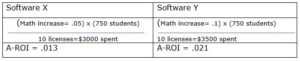
Let’s imagine that your district is piloting two software programs, and you want to evaluate them for A-ROI. For the sake of simplicity, let’s say that you test both programs with ten math teachers with an average of 75 students each. Software program X helps math teachers save ten hours per year. These extra planning hours raise math scores by 5%. Software X costs $300 per license.

Software program Y helps math teachers save 10 hours, provides data to drive instruction, and gives students helpful practice. Students’ math scores go up 10%. Software Y costs $350 per license.

Despite costing more per license, Software Y has a significantly better A-ROI.

Valuing Educator Time as a Strong A-ROI

In addition to more time for planning and collaborating, another benefit of investing in work efficiency is that it enhances morale. Menial tasks make teachers feel that the districts do not appreciate their expertise. Feeling undervalued often contributes to teacher attrition. Since hiring and training new teachers costs considerably more than retaining highly qualified teachers, it behooves district leaders to provide them with time-saving tools.

Using EdTech to Assess A-ROI

Not only can you use A-ROI to assess your EdTech, but you can also use EdTech to evaluate the A-ROI of other programs. The A-ROI formula appears deceptively simple. The challenge lies in collecting information to put into the formula. Many administrators explain that software platforms’ ability to help assess A-ROI is where the platforms shine.

EdTech software such as Castle LearningeDoctrinaedInsight, and eWalk help measure learning. They also make it easy to aggregate and disaggregate data, analyze the information, and share it with others. The platforms allow administrators to see the effect size of various programs by segmenting student populations. These robust capabilities make answering questions about A-ROI possible.

You might want to pilot two different strategies before deciding on one and expanding it. For example, you might try reducing class sizes for half the fifth graders in the district and free after-school tutoring for the other half. Using the data software programs, you can look at the fifth-grade groups to see how many students benefitted, to what degree, and for what price. You will then have meaningful information to feel confident in making the best decision about expansion.

Ask Educators

While A-ROI provides important numerical information, educators’ experiences about EdTech solutions provide valuable insight too. Ask teachers and principals for details about how different programs changed their workday and advanced student learning.

EdTech Solutions as a Tool to Help People

Teachers inspire, encourage, and educate our future leaders. District leaders provide the tools for teachers to thrive. At Harris Education Solutions, we develop EdTech to help educators support student success. Take our Solutions Tool survey to discover the platform that best meets your A-ROI goals.

Nine Ideas to Keep the Learning Going All Summer Long

If you are like many school administrators, spring is when you start feeling pressure to help students maintain their learning during the summer months. Considering the recent educational interruptions and hardships from COVID, preventing summer learning loss is more important than ever. So how can you persuade students to continue learning during the summer months? It’s tricky, but some districts are trying some creative problem-solving. Here are a few ideas.

Most districts offer summer school as part of the solution. Summer school has various forms and goes by many names, such as extended school year, credit recovery program, academic camp, and summer academy. Whatever you call summer school, it translates to more days learning, building relationships, and engaging minds. While the potential benefits are clear, attendance is typically low. Families don’t prioritize summer school at the same priority level as they do during the regular school year. It may be tempting to hold back promoting unless they regularly attend, but this approach would result in unpleasant backlash from families.

To promote learning without threatening negative consequences, try some of these ideas:

  1. Ask families ahead of time what barriers they might have for student attendance and try to remove those barriers.
  2. Encourage “Self-Study” on Castle Learning so students can keep practicing their skills even if they miss a few days of class. You can also suggest Self-Study to make up for missing assignments or extra credit. Self-Study allows students to learn and progress at their own pace in many subjects and levels. The questions come from the bank of questions that teachers can select. The questions have all the same great features you have come to expect from Castle Learning, such as hints and instant feedback. Teachers can track student progress so they can give credit or incentives to students who learn with it.
  3. Lengthen summer school sessions to accommodate poor attendance.
  4. Offer a remote school option, so students learn from grandma’s house or wherever they happen to be.
  5. Try to make summer school enjoyable with fun activities and themes.
  6. Offer summer school right before school starts or right after the school year ends so it doesn’t feel like as much of an interruption to vacation.
  7. Offer incentives for good attendance.
  8. Incorporate other services and perks such as using a community garden, meals, and special events into the summer school program.
  9. Despite all your efforts, some of your students will be unable to attend summer school. Suggest that they use “Self-Study.” You may even offer an incentive program to increase participation. Students can choose “Rocket Mode” or “Expert Mode.” Rocket Mode is the default choice because it has a more straightforward user interface, and we generally recommend it. The expert mode works well for high school students who have specific topics they want to review for a test. Students can use this guide for navigating self-study.

Like students, most teachers would rather be relaxing in the summer. Ask teachers how you can entice them to teach during the summer and try to provide those things. Think beyond pay (which is also important) to make teaching during the summer more enjoyable. Teachers agreeing to teach summer school appreciate the resources on Castle Learning for reducing the time they spend on prepping and grading assignments. The platform is easy for teaching remotely, in person, or a combination.

At Harris Education Solutions, we want students to feel prepared in the fall. To aid in that goal, Castle Learning provides courtesy access for existing customers over the summer months.

Supporting English Language Learners

Everyone wants more resources to help English language learners. Harris Education Solutions has two platforms that teachers of ELL students appreciate. Castle Learning and eDoctrina include several tools that support students overcoming language barriers.

Different Tools for Different Levels of English Proficiency

English language learners have widely different instructional needs based on their backgrounds. While not every tool available on the Castle Learning and eDoctrina platforms is appropriate for every ELL student, each feature greatly benefits a particular subset of ELL students.

Plenty of ELL students have lived in the US for years. Many of these students have an advantage over their monolingual peers because multilingualism promotes cognitive development. However, biliteracy takes years to develop, so primary teachers will want to provide consistent support and instruction to promote English proficiency and literacy. Teachers will also want to encourage developing fluency and literacy in the home language whenever possible.

Recently immigrated students frequently need significant, global support. In addition to their academic challenges, they often struggle with culture shock and homesickness. Immigrant students with a solid academic background will transfer their content knowledge and skills, making their transition less challenging than immigrants with minimal formal education.

Whatever the new arrivals’ background, your patience and empathy make adjusting to a new system, culture, and language less stressful. The Castle Learning and eDoctrina platforms decrease the work it takes to meet their academic needs, freeing some time to support their emotional needs.

Helping ELL Students Meet the Standards

The educational goal for ELL students is the same as their native English-speaking peers. Regardless of their background, they should meet the standards in all subjects, including English literacy. To help students succeed, teachers scaffold content lessons and teach English. Students with more limited English proficiency may also need their assignments adapted.

Castle Learning and eDoctrina make scaffolding and adapting easier. The platforms also include resources for teaching English.

Scaffolding means structuring lessons to help ELL students meet the same objectives as their peers. Teachers unfamiliar with scaffolding instruction sometimes make the mistake of choosing activities that require only low-level thinking skills. Watered-down instruction limits English language learners’ access to a quality education.

Adapting assignments and assessments provides a way for some ELL students to show what they know. These adaptations lower the frustration level for immigrant students struggling in a new language.

Follow State Guidelines

Your state provides guidelines for assessing, setting benchmarks, and promoting quality instruction for English language learners. Thirty-five states belong to the WIDA consortium, which provides the comprehensive WIDA 2020 Standards Framework. Notably, CaliforniaArizonaTexas, and New York, which all have high concentrations of English language learners, use independent frameworks. Some districts may supplement the state’s framework.

You will want to use your state’s formal assessment to measure students’ English proficiency for academics. Gauging students’ proficiency levels with informal interactions distorts perceptions. Many students have a higher level of proficiency in social contexts than they do in academic contexts. The distinction misleads many educators into thinking that some students no longer need supports. Sadly, sometimes teachers wonder if a child is “faking” not understanding due to the discrepancy in academic and social language proficiency.

To experience how ELL students often feel reading in a non-native language, you might try reading articles in The New England Journal of Medicine. Notice how much time and concentration it takes to understand text with unfamiliar ideas and words.

Provide Support with Scaffolded Instruction

You could spend years learning to scaffold instruction. Below are a few quick ideas to get you started:

  • Connect prior knowledge to new lessons.
  • Pre-teach and display academic vocabulary.
  • Use graphic organizers and other visual aids to help students organize information.
  • Teach and display sentence frames related to the content. Sentence frames allow students to fill in the blanks with their ideas without coming up with the syntax. For example, a history teacher might teach, “The ______ caused _______ because _______.”
Provide Support by Adapting Assignments

Here are a few ideas on how to adapt assignments and assessments for ELL students needing additional supports. These adaptations are beneficial for students with low to medium levels of English proficiency and literacy.

  • Irregular spelling doesn’t make learning to read English easy. “Enough” and “though” don’t rhyme, but “queue” and “to” do. Students with emerging literacy skills benefit from hearing and reading words simultaneously. Give students audio versions of written text until they read fluently in English.
  • Reading text in a non-native language takes longer to process. Give ELL students enough time to think by individualizing how much time you allow them on assessments.
  • Provide extra practice before tests, so students hear the associated vocabulary more.
  • Allow newly arrived students with minimal English skills to use a dictionary or translation tool to help them understand.
Use eDoctrina and Castle Learning to Teach English, Scaffold Instruction, and Adapt Assignments

eDoctrina and Castle Learning reduce the workload of supporting ELL students. Choose the appropriate features to make your life easier and meet the needs of your ELL students. All features are available on both platforms unless otherwise noted.

  • Share your best assignments with other ESL teachers with a few clicks. Invite them to share their best assignments with you too. Collaborating to create effective ESL resources will help students improve their English proficiency.
  • Supplement your ELA program with a wealth of pre-made English language arts resources.
  • Add explanations to assignments that help ELL students access the material.
  • Upload graphic organizers, videos, and pictures to any assignment to help students visualize ideas.
  • Customize the assessment window for students who would benefit from extra time.
  • Provide assessments in Spanish for newly arrived Spanish-speaking students. Castle Learning has assessments available in Spanish to help you check a student’s understanding of various subjects and place them in the correct classes. You can print these in Spanish or convert them online. Available Spanish translations include NYS Regents exams in Algebra I, Global History and Geography, US History, Earth Science, and Living Environment.  Castle Learning also offers K-12 reading sets that are translated into Spanish.
  • Encourage continued literacy in French or Spanish if that is their home language with Castle Learning.
  • Allow students to use the Google Translate feature to translate a question or passage into their native language. Google Translate is far from perfect, but it is often sufficient for students to understand the content and not spend time translating.
  • Help students overcome some of the obstacles of English spelling oddities by allowing them to use the text-to-speech feature.
  • Preview vocabulary with Castle Learning. Later, when students come across the word in the lesson context, they will better understand what it means and how to use it. Castle Learning has a vast bank of vocabulary questions that you can search by keyword, level, and subject. You can also quickly make digital vocabulary flashcards.
  • Assign Castle Learning’s self-study to direct students to practice in the subjects they need help. The self-study feature provides unlimited practice and instant feedback with vocabulary and language structures.
  • Include audio, video, or text to any assignment using eDoctrina. Students can also answer with audio, so they get practice speaking.
One Lesson at a Time

When you first start teaching ELL students, helping them achieve grade level may feel daunting. However, helping them flourish is one of the most rewarding parts of any teacher’s career. At Harris Education Solutions, we make tools to help you do your best work.

Applying Progressive Teaching Practices to the Post-Pandemic Era

The most important professional lessons often come at a price. If you are like most educators, this school year you shed tears of frustration and spent endless hours adapting your methods to provide a quality education to your students. You persevered despite overwhelming challenges. Educators are reflecting on the changes they made during COVID-19. They realize that although they prefer teaching face-to-face, they learned a lot from blended and remote teaching.

We asked teachers what practices they adjusted for the pandemic that they plan to continue next year. Their responses indicate three significant shifts:

1. Increasing the frequency of doing bonding activities
2. Aggressively mitigating contagions
3. Embracing more technological tools

Doing Bonding Activities Frequently

In a pre-pandemic classroom, some teachers relied on spontaneous interactions to build community. They planned few activities to create bonds among the students. In pre-pandemic times, teachers didn’t have to work as hard to build relationships with students and their families. Remote and blended learning decreased spontaneous interactions. To make up for that loss, teachers added more bonding exercises into their lesson plans. They also devoted more time to get to know their students and their families.

They discovered that these bonding activities made a dramatic difference to the culture of the class. Even though returning to face-to-face instruction will increase spontaneous interactions, teachers want to continue intentionally providing ample opportunities for bonding. They figure that if they successfully built a strong learning community remotely, the rapport will be incredible when they see each other daily and plan bonding activities.

Some favorite bonding activities include:

  • Daily emotional check-ins
  • Doing “show-and-tell” activities even at the high school level
  • Writing personalized emails and notes to students and families
  • Starting lessons with ice-breaker activities
  • Incorporating calming community activities such as stretching, listening to music, and manipulating playdough at regular intervals
  • Teaching skills for improved inter-personal relationships
  • Providing time for students to chat
  • Doing virtual home visits
  • Using Bitmojis to get to know each other
Mitigating Contagions

Teachers would like to focus more on promoting a healthy environment. In pre-pandemic classrooms, contagions such as lice, strep throat, pink eye, the flu, stomach bugs, and the common cold ran rampant through classes. Teachers said that common ailments decreased dramatically this year because they were so vigilant about keeping germs at bay. Several teachers reported only going through one box of tissue!

Students with mild illnesses may be asked to stay home to prevent spreading contagious bugs to others. Individual differences in immune systems and access to healthcare repeatedly made the headlines this year. No one wants to see a child in the ER because another child came to school with mild symptoms. Many teachers plan to continue aggressively mitigating contagion by sanitizing desks, enforcing frequent handwashing, and changing their attendance policies.

Embracing Technology

Up until March 2020, teachers could teach incredible lessons using minimal technology. However, not using technology stopped being a viable choice with distance and blended learning. More teachers are much more technologically savvy than before the pandemic and will continue embracing EdTech tools.

They discovered that EdTech tools helped overcome obstacles such as access, logistics, differentiation, engagement, and data gathering. Responding teachers plan to continue using video conferencing, learning management systems, and assessment and curriculum platforms.

Using so many digital resources significantly reduced the amount of paper students used. Teachers found that they preferred fewer papers because they didn’t have to carry and keep track of so many things. These teachers also appreciated spending less time at the copy machine creating packets. Students, though, are a little sad that “the dog ate my homework” is less believable when the homework was digital.

Zoom, Microsoft Teams, and other Video Conferencing Apps

Video conferencing solves many logistical issues and allows for a mix of in-person and remote participants. Few teachers want to teach remotely all the time, but they like that students can attend virtually when circumstances prevent them from attending in person. On the other hand, many people are less pleased with the development of districts canceling snow days in favor of “remote learning days.”

Teachers mentioned how they prefer video conferencing for parent-teacher conferences, back-to-school nights, and staff meetings. It reduced transition time, allowing teachers to keep a tighter schedule. Transportation, childcare, and mild health problems are no longer barriers to participating.

Pear Deck, NearPod, and other Interactive Apps

Teachers noticed that interactive apps improved collaboration and engagement. They said that the relative anonymity enhanced the quality of several students’ work. Class clowns spent less time distracting their peers, introverted students felt more comfortable sharing, and struggling students asked for help more. Some favorite interactive apps include digital whiteboards, quiz games, video sharing, Bitmoji, and social media.

Google Classroom, Schoology, Canvas, and other Learning Management Systems

Many more teachers started using Learning Management Systems during the pandemic. They liked that students had increased access to the curriculum and content. Some teachers even plan to continue videoing their lessons so absent students and those wanting a review can access them. Teachers found that posting content on an LMS reduced their time of tracking who did what when. They liked that the LMS allowed motivated students to find what they need without teacher assistance.

Curriculum and Assessment Platforms such as Castle Learning, edInsight, and eDoctrina

Knowing that teachers were overwhelmed during the pandemic, many more districts signed up for robust curriculum and assessment platforms. Teachers cherished the ease of creating great computer-based assignments and assessments. They especially appreciated the ability to deliver differentiated assignments without other students knowing. Castle Learning and eDoctrina integrate with Canvas and Google Classroom so students can access everything from one place. Students liked getting immediate feedback, and teachers liked saving hours of grading time. Faster feedback is an important element for improving student learning.

Having a bank of pre-made questions available made it easier for teachers to give frequent formative assessments. Using the available Engage New York summative assessments gave educators an excellent barometer of student achievement. These testing platforms and data reports help district leaders make data-driven decisions whether or not state testing occurs. 

Data reports about student needs are also a key element of fidelity to the Multi-Tiered Support System or MTSS. The ecosystem of products at Harris Education Solution focuses on making data easy to access and use. 

Revolutionary Changes Never Come Easy 

The pandemic left scars. However, returning education to pre-pandemic practices would be a mistake because it would eliminate the lessons that adversity taught us. Planning bonding activities, limiting the spread of germs, and welcoming more technology into the classroom are three of many practices that teachers expressed interest in maintaining.

Applying lessons from the pandemic will take some effort, but students need it now more than ever. At Harris Education Solutions, we supply EdTech tools that offer valuable insights and save time to support educators and drive student growth.

Make the Most of Every Minute of Class

COVID-19 Puts a Strain on an Already Scarce Resource – Time

Every instructional minute is precious. You have diverse learners needing to learn a lot of material in a short time. Hybrid and remote learning has amplified the challenge of optimizing instructional time. Routines such as taking attendance, cleaning, and checking for understanding take a bigger bite out of instructional time than usual.

To make the most of every instructional minute, try these three steps:

  1. Analyze contact minutes to identify time spent on administrative and custodial tasks.
  2. Increase the time you spend on actions that promote learning.
  3. Improve the effectiveness of instruction.
Analyze Contact Minutes to Identify Time Spent on Administrative and Custodial Tasks

Think about each minute you are with students. You want to streamline everything you do that is not tied to students learning. Use a simple accounting method to code your daily tasks by whether or not it advances student learning.

Use these notations for each routine task – PL for Promotes Learning, and AC for Administrative and Custodial. For example, taking attendance and approving bathroom visits are Administrative and Custodial, whereas Promote Learning would be for direct instruction and facilitating a class discussion.

Next, use the PL and AC codes to track how many minutes per hour you spend on tasks not tied to student learning. Simultaneously tracking and teaching would be challenging, if not impossible. Enlist the help of your colleagues. You and a colleague could use planning periods to help each other, or you could request an instructional coach to observe and track.

You may even ask students to observe and track. If you have young remote learners, their caregivers could help. Remote learners and their caregivers will have a different perspective on how much time is devoted to non-learning activities than you do. Asking for their observations will give you a more robust understanding of what you do not see.

Using eWalk would make gathering and analyzing the information manageable. eWalk is a flexible cloud-based app designed to help educators improve instruction by organizing observational data.

Increase the Time you Spend on Actions that Promote Learning

After getting a clear understanding of how you spend your contact minutes, try to streamline AC tasks. Every minute that you convert from an AC to a PL helps students stay engaged and learn more. Even modest improvements add up. Assuming 180 days of instruction, if you convert five minutes per day from AC to PC, your students receive 15 hours more hours of instruction in a year. Think of what your students could learn in 15 extra hours!

To take your spirit of improvement to the next level, involve the whole school. Ask school leaders to create an eWalk survey of the staff. This second survey will gather ideas about what other teachers do to reduce time spent on administrative and custodial tasks. These surveys act to solidify a culture of collaboration, valuing time, and data-driven instruction.

You probably won’t be able to convert all your administrative and custodial minutes. Set up ways for students to engage in independent learning during these times. When you must complete administrative and custodial duties, try one of these independent activities: reading, writing, completing emotional check-ins, doing warm-up exercises, and taking quick formative assessments. Castle Learning, eDoctrina, and edInsight offer easy cloud-based assessment tools that work equally well for remote and in-person learners.

Improve the Effectiveness of Instructional Time

After increasing instructional minutes, you will want to make the most of those minutes. The following ideas will help you improve the effectiveness of each instructional minute.

  • Plan your lessons to address specific learning outcomes using the district curriculum and state standards. A curriculum that is hard to access and transfer into planning makes identifying the desired learning outcomes challenging. Administrators can help teachers by providing easy to use curriculum and planning tools. edInsight software makes the curriculum more accessible and user friendly to facilitate setting goals, lesson planning, and collaborating.
  • Assess frequently to use data-driven instruction. Computer-based assessments make monitoring students’ progress easier. Not only are computer-based assessments easier to create and administer, but the data organization is also far superior to paper and pencil tests. You will have a better understanding of students’ level of mastery. You will then know how to differentiate instruction and choose lessons that address student needs. Targeted instruction advances your students toward meeting and exceeding the standards.
  • Use a dashboard to create groups for remediation and acceleration. Students get more value from their class time when instruction targets their specific needs. Student dashboards, like those from edInsight and eDoctrina, make differentiating instruction easier because you see at a glance where each student needs support.
  • Use individualized learning apps to take advantage of downtime. Students who work faster than their peers often get bored waiting for the next learning opportunity. Apps such as Castle Learning, edInsight’s Kandoolu, and others allow students to work on the specific skill they are ready to practice.
  • Communicate with caregivers of remote students about how students are responding to remote lessons. Remote instruction adds several layers of complexity to getting feedback about student understanding. Many remote students fail to alert the teacher when they don’t understand. Teachers then lose the opportunity to address the problem at the moment.

Sometimes the caregiver attempts to help and has various levels of success. Other times, students wait for the teacher to notice that they are struggling. Asking caregivers for their feedback and suggestions will go a long way to solve this problem. Once again, eWalk would be a valuable tool for gathering and organizing information.

Putting it All Together

While making the most out of every contact moment takes some effort, the rewards are worth it. Consider a science teacher who has 180 student contact hours per student per year. First,  streamlining her administrative and custodial tasks increases instructional minutes by five minutes per class. This change gives her students 15 more hours of instruction per year. Then, improving the effectiveness of every instructional minute by 10% is equivalent to adding six minutes to every hour of class. The students effectively get another 1080 minutes or 18 hours to the school year.  15 hours + 18 hours =  33 more hours of science.

That is an increase of almost 20% and enough time for students to learn a lot more science!